Source Code
<div class="trt-card">
  <div class="trt-head">
    <h3>Budget by department</h3>
    <button type="button" class="trt-toggle-all" id="trtToggleAll">Collapse all</button>
  </div>
  <table class="trt-table">
    <thead>
      <tr><th>Category</th><th class="trt-num">Budget</th><th class="trt-num">Spent</th><th class="trt-num">Remaining</th></tr>
    </thead>
    <tbody id="trtBody"></tbody>
  </table>
</div>*{box-sizing:border-box;margin:0;padding:0}
body{font-family:system-ui,-apple-system,sans-serif;background:#f8fafc;min-height:100vh;display:flex;align-items:flex-start;justify-content:center;padding:40px 24px}
.trt-card{background:#fff;border-radius:16px;padding:18px;width:100%;max-width:600px;box-shadow:0 18px 44px rgba(15,23,42,.08)}
.trt-head{display:flex;align-items:center;justify-content:space-between;margin-bottom:12px}
.trt-head h3{font-size:16px;font-weight:800;color:#0f172a}
.trt-toggle-all{border:1.5px solid #e2e8f0;background:#fff;border-radius:8px;padding:6px 12px;font-size:12px;font-weight:700;color:#475569;cursor:pointer}
.trt-toggle-all:hover{border-color:#cbd5e1}
.trt-table{width:100%;border-collapse:collapse;font-size:13px}
.trt-table th,.trt-table td{padding:10px 12px;text-align:left}
.trt-num{text-align:right!important;font-variant-numeric:tabular-nums}
.trt-table thead th{background:#f8fafc;color:#475569;font-weight:700;font-size:11.5px;text-transform:uppercase;letter-spacing:.03em;border-bottom:1.5px solid #e2e8f0}
.trt-table tbody td{border-bottom:1px solid #f1f5f9;color:#334155}
.trt-table tbody tr:hover{background:#fafbfc}
.trt-name{display:flex;align-items:center;gap:6px}
.trt-toggle{width:18px;height:18px;border:none;background:none;color:#94a3b8;cursor:pointer;display:flex;align-items:center;justify-content:center;flex-shrink:0;border-radius:4px;transition:background .12s,transform .2s}
.trt-toggle:hover{background:#f1f5f9}
.trt-row.expanded .trt-toggle{transform:rotate(90deg)}
.trt-toggle.leaf{visibility:hidden}
.trt-row[data-depth="0"] .trt-name{font-weight:800;color:#0f172a}
.trt-row[data-depth="1"] td:first-child{padding-left:34px}
.trt-row[data-depth="2"] td:first-child{padding-left:58px}
.trt-row[data-depth="1"] .trt-name{font-weight:600}
.trt-row[data-depth="2"] .trt-name{font-weight:500;color:#64748b}
.trt-row.hidden-row{display:none}
.trt-bar{display:inline-block;width:42px;height:5px;border-radius:999px;background:#f1f5f9;overflow:hidden;vertical-align:middle;margin-left:8px}
.trt-bar i{display:block;height:100%;border-radius:999px;background:#6366f1}var DATA = [
{ id: 'eng', name: 'Engineering', budget: 480000, spent: 312000, children: [
{ id: 'eng-plat', name: 'Platform', budget: 220000, spent: 158000, children: [
{ id: 'eng-plat-1', name: 'Infrastructure', budget: 130000, spent: 99000 },
{ id: 'eng-plat-2', name: 'Tooling', budget: 90000, spent: 59000 },
]},
{ id: 'eng-app', name: 'Applications', budget: 260000, spent: 154000, children: [
{ id: 'eng-app-1', name: 'Web', budget: 150000, spent: 92000 },
{ id: 'eng-app-2', name: 'Mobile', budget: 110000, spent: 62000 },
]},
]},
{ id: 'mkt', name: 'Marketing', budget: 210000, spent: 178000, children: [
{ id: 'mkt-1', name: 'Paid acquisition', budget: 140000, spent: 131000 },
{ id: 'mkt-2', name: 'Content', budget: 70000, spent: 47000 },
]},
{ id: 'ops', name: 'Operations', budget: 95000, spent: 71000 },
];
var body = document.getElementById('trtBody');
var expanded = {}; // id -> true
function money(n) { return '$' + n.toLocaleString(); }
function flatten(nodes, depth, parentId, out) {
nodes.forEach(function (n) {
out.push({ node: n, depth: depth, parentId: parentId, hasChildren: !!(n.children && n.children.length) });
if (n.children) flatten(n.children, depth + 1, n.id, out);
});
return out;
}
function isVisible(row, byId) {
// A row is visible only if every ancestor is expanded.
var p = row.parentId;
while (p) {
if (!expanded[p]) return false;
p = byId[p].parentId;
}
return true;
}
function render() {
var rows = flatten(DATA, 0, null, []);
var byId = {};
rows.forEach(function (r) { byId[r.node.id] = r; });
body.innerHTML = rows.map(function (r) {
var n = r.node;
var remaining = n.budget - n.spent;
var pct = Math.min(100, Math.round((n.spent / n.budget) * 100));
var vis = isVisible(r, byId);
var caret = r.hasChildren
? '<button type="button" class="trt-toggle" data-id="' + n.id + '"><svg width="11" height="11" viewBox="0 0 24 24" fill="none" stroke="currentColor" stroke-width="3" stroke-linecap="round" stroke-linejoin="round"><polyline points="9 18 15 12 9 6"/></svg></button>'
: '<span class="trt-toggle leaf"></span>';
return '<tr class="trt-row' + (expanded[n.id] ? ' expanded' : '') + (vis ? '' : ' hidden-row') + '" data-depth="' + r.depth + '">' +
'<td><span class="trt-name">' + caret + n.name + '</span></td>' +
'<td class="trt-num">' + money(n.budget) + '</td>' +
'<td class="trt-num">' + money(n.spent) + '<span class="trt-bar"><i style="width:' + pct + '%;background:' + (pct >= 90 ? '#ef4444' : '#6366f1') + '"></i></span></td>' +
'<td class="trt-num">' + money(remaining) + '</td>' +
'</tr>';
}).join('');
}
body.addEventListener('click', function (e) {
var btn = e.target.closest('.trt-toggle');
if (!btn || btn.classList.contains('leaf')) return;
var id = btn.dataset.id;
expanded[id] = !expanded[id];
render();
});
var allOpen = true;
document.getElementById('trtToggleAll').addEventListener('click', function () {
allOpen = !allOpen;
expanded = {};
if (allOpen) flatten(DATA, 0, null, []).forEach(function (r) { if (r.hasChildren) expanded[r.node.id] = true; });
this.textContent = allOpen ? 'Collapse all' : 'Expand all';
render();
});
// Start with top level expanded.
DATA.forEach(function (n) { if (n.children) expanded[n.id] = true; });
flatten(DATA, 0, null, []).forEach(function (r) { if (r.hasChildren) expanded[r.node.id] = true; });
render();Learn Coding Visually
Learn to code with interactive, live-preview playgrounds — HTML, CSS, JavaScript, React & more.
 HTML Playground42 lessons · Click-based · Live preview
 CSS PlaygroundLearn CSS with a live editor
 JavaScript Playground60 lessons · DOM · Async · Canvas
 React PlaygroundLearn React with a live code editor
 GSAP PlaygroundLearn GSAP animation interactively
 SVG Playground44 lessons · shapes · paths · animation
 SCSS Playground45 lessons · Sass modules · tokens
 Tailwind PlaygroundLearn Tailwind CSS with a live editor
 Bootstrap 5 Playground50 lessons · live preview
Tree Table — Expandable Hierarchy Rows HTML CSS JS
Tree Table · Tables · Plain HTML, CSS & JS · Live preview
What's included
Features
About this UI Snippet
Tree Table — Collapsible Nested Rows for Hierarchical Data
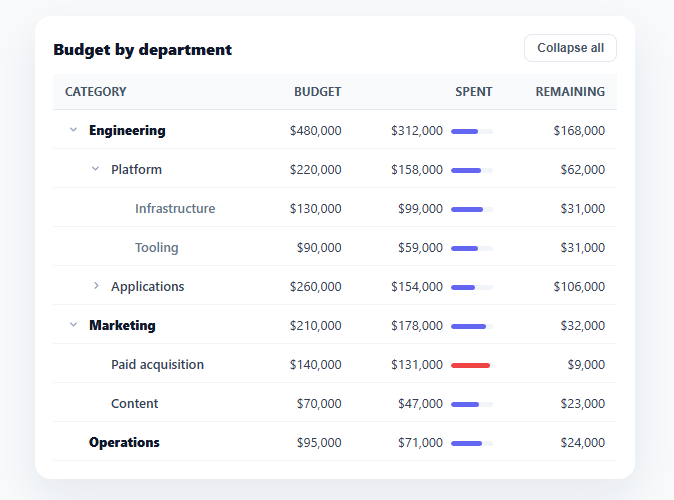
Some data is naturally a hierarchy — a budget by department and sub-team, a file system, a category tree, an org chart of accounts — and a flat table can't show those parent/child relationships. A tree table solves it: rows nest under expandable parents, indented by depth, so you can drill from a top-level total down to its details and collapse what you don't need. This snippet builds that pattern in plain HTML, CSS, and vanilla JavaScript over a real <table>, with any depth of nesting.
Nested data, flattened for rendering
The source is a nested tree of objects, each with optional children. flatten() walks that tree depth-first into a flat list of rows, each tagged with its depth and parent id — because a <table> body is a flat list of <tr>s, not a nested structure. This flatten-with-metadata step is the core technique: it lets you keep your data as a natural hierarchy while rendering it as the linear rows a table requires, and it works for unlimited depth (the demo goes three levels deep).
Visibility derived from ancestor expansion
A child row is visible only when *every* ancestor above it is expanded — collapsing a top-level row should hide its grandchildren too, not just its direct children. isVisible() walks up the parent chain and returns false if any ancestor is collapsed, so the show/hide logic is always correct no matter how deep the nesting or which level you collapse. Expansion state lives in a simple expanded map of id → boolean, the single source of truth that the render reads.
Indentation and disclosure triangles
Each row indents by its depth (via a left-padding rule per depth level) and shows a rotating disclosure triangle that points right when collapsed and down when expanded — the universal tree-control affordance. Leaf rows (no children) get an invisible spacer where the triangle would be, so their text still aligns with siblings that do have triangles. Top-level rows are bold, deeper rows progressively lighter, reinforcing the hierarchy visually beyond just indentation.
Roll-up context per row
Because tree tables usually show aggregates (a parent's budget is the sum of its children's), each row here includes a little spend bar that fills proportionally and turns red past 90% — so you can scan utilization down the hierarchy. In a real app the parent values would be computed from the children (covered in the FAQs); the structure supports either pre-computed or rolled-up totals.
Expand-all / collapse-all
A header button toggles the entire tree open or closed at once — essential for a deep hierarchy where expanding level by level is tedious. It rebuilds the expanded map (all parent ids true, or empty) and re-renders, flipping its own label between "Expand all" and "Collapse all." The tree starts with the top level expanded so the structure is immediately visible without hiding everything.
A real table, kept accessible
It's a genuine semantic <table> with <thead>/<tbody>, so it reads as tabular data to assistive tech and works with table styling. The disclosure triangles are real <button>s. For full accessibility you'd add aria-expanded to each toggle and role="treegrid" semantics (covered in the FAQs), but the foundation — semantic table, flattened render, ancestor-aware visibility — is the right base for any hierarchical table.
Build with AI
Build, Understand, Optimize, and Extend It With AI
Rather than tracing the recursion by hand, paste this snippet's HTML, CSS, and JS into an AI coding assistant like Claude and ask it to explain exactly why isVisible() has to walk the full parentId chain instead of just checking the immediate parent's expanded state, and what would break if it only checked one level up. It's also worth asking about optimization — the current render() calls flatten() on the full DATA tree and rebuilds every row's HTML string on every single toggle click, so ask whether that's a real cost at, say, ten thousand rows, and what a targeted update would look like instead. For extending it, have it add a recursive roll-up so parent budget and spent totals are computed from children rather than hand-entered, real aria-expanded/role=treegrid accessibility, or a lazy-loading mode where a node's children are fetched only the first time it's expanded. Treat the code less like a finished artifact and more like a starting point for a conversation.
Prompt to recreate it
Copy this into your AI assistant of choice to build the effect from scratch, or as a jumping-off point for your own variant:
Build a "tree table" in plain HTML, CSS, and vanilla JavaScript over a real semantic table element — no nested tables, no libraries.

Requirements:
- Source data is a tree of objects, each with a name, numeric fields, and an optional children array of unlimited nesting depth.
- Write a recursive flatten(nodes, depth, parentId, out) function that walks the tree depth-first and produces a flat array of rows, each tagged with its own depth, its parentId, and a hasChildren boolean, since a table's tbody can only render a flat list of tr elements.
- Track expansion state as a single id-to-boolean map, not scattered per-row DOM flags.
- Write an isVisible(row, byId) function that walks up the full chain of ancestor parentIds (not just the immediate parent) and returns false if any ancestor anywhere up the chain is collapsed, so collapsing a top-level row correctly hides every level of its descendants, not only its direct children.
- Every row must indent by its depth (increasing left padding per level) and show a disclosure triangle that rotates when its row is expanded; leaf rows with no children must render an invisible spacer in the same column so their text still lines up with sibling rows that do have a triangle.
- Add a header button that toggles the entire tree fully open or fully closed in one click, rebuilding the expansion map and re-rendering, and that flips its own label between "Expand all" and "Collapse all".
- Re-render the whole table body from the flattened, visibility-filtered row list on every toggle click rather than mutating individual DOM rows in place.
Want to tighten it up first? Run this prompt through the AI Prompt Studio to score it across 8 quality dimensions, catch anti-patterns, and tune the wording for Claude, ChatGPT, or Gemini before you paste it in.
Step by step
How to Use
- 1Paste HTML, CSS, and JSA budget tree table renders with departments expanded, showing nested sub-teams and line items.
- 2Collapse a branchClick a parent's triangle to collapse it — all its descendants hide, and the triangle rotates to point right.
- 3Drill downExpand a department, then a sub-team, to reach the deepest line items; indentation shows the depth.
- 4Toggle everythingUse "Collapse all" / "Expand all" in the header to open or close the whole tree at once.
- 5Read the spend barsEach row's mini bar shows budget utilization, turning red past 90%, so you can scan the hierarchy.
- 6Use your own dataReplace the DATA tree with your nested objects (name, values, optional children) — any depth renders.
Real-world uses
Common Use Cases
Got questions?
Frequently Asked Questions
Add a recursive aggregate function that, for any node with children, sums its children's values (which themselves may be sums) — compute budget/spent for parents as the total of their descendants rather than storing them. Run it once on the DATA tree before rendering, so every parent row shows the true roll-up of everything beneath it, and the numbers stay consistent as you edit leaves.
An HTML table body is a flat list of rows; nesting <table>s inside cells breaks column alignment and accessibility. Flattening the tree into rows tagged with depth and parent id keeps one aligned table while preserving the hierarchy in the data — indentation conveys depth visually, and the parent/depth metadata drives expand/collapse and visibility. It's the standard approach for tree tables.
Use role="treegrid" on the table, add aria-expanded (true/false) to each parent's toggle button reflecting its state, aria-level matching the depth on each row, and aria-setsize/aria-posinset for position. Ensure the toggles are keyboard-operable (they're buttons, so Enter/Space work) and consider arrow-key navigation between rows. The semantic <table> base makes layering these straightforward.
Mark nodes that have children but haven't loaded them (e.g. hasChildren: true, children: null), render their toggle, and on first expand fetch the children from your API, insert them into the node, and re-render. This avoids loading a massive tree upfront — the flatten/visibility logic works the same once children are populated.
In React, hold the expanded map (or a Set of ids) in useState and derive the flattened, visibility-filtered rows with useMemo, rendering with .map(); in Vue, use a reactive expanded object with a computed rows list; in Angular, use a component field and a getter. The flatten and isVisible functions are plain JavaScript that port unchanged — only the per-toggle re-render moves into the framework.