Learn Coding Visually
Learn to code with interactive, live-preview playgrounds — HTML, CSS, JavaScript, React & more.
 HTML Playground42 lessons · Click-based · Live preview
 CSS PlaygroundLearn CSS with a live editor
 JavaScript Playground60 lessons · DOM · Async · Canvas
 React PlaygroundLearn React with a live code editor
 GSAP PlaygroundLearn GSAP animation interactively
 SVG Playground44 lessons · shapes · paths · animation
 SCSS Playground45 lessons · Sass modules · tokens
 Tailwind PlaygroundLearn Tailwind CSS with a live editor
 Bootstrap 5 Playground50 lessons · live preview
Text Case Converter — Free HTML CSS JS Snippet
Text Case Converter · Misc · Plain HTML, CSS & JS · Live preview
What's included
Features
About this UI Snippet
Text Case Converter — Ten Simultaneous Casing Conventions from a Single Tokenizer
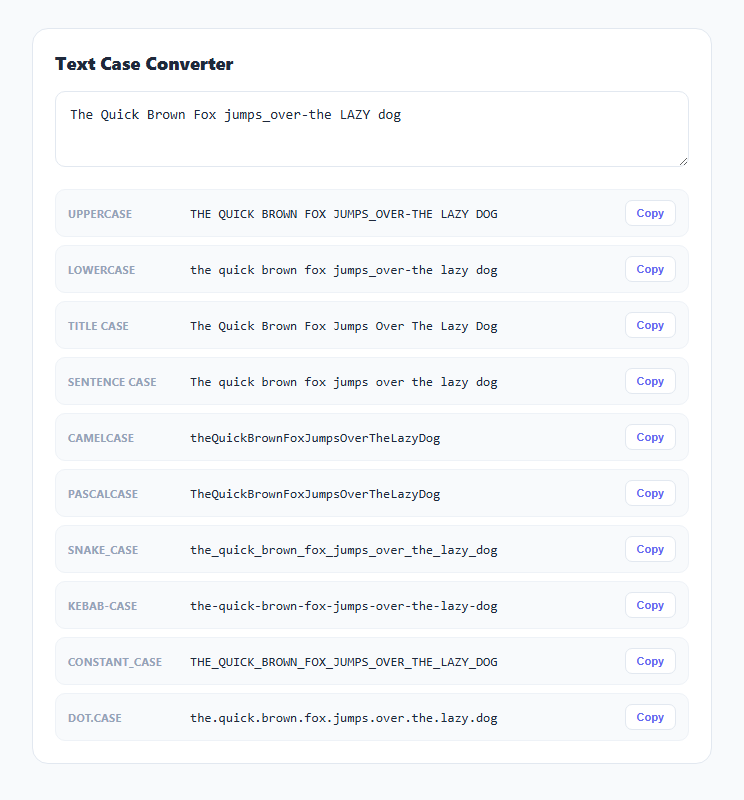
Naming conventions across programming languages and writing contexts vary wildly — a database column might use snake_case, a JavaScript variable camelCase, a React component PascalCase, and a URL slug kebab-case, all describing conceptually the same identifier. This snippet converts one input into all ten common conventions at once, so you never have to guess or manually retype an identifier when moving between contexts that expect different casing.
One tokenizer, ten output formats
The core of this tool is a single tokenize() function that all ten conversions share. Rather than writing ten separate parsing functions, tokenize() normalizes *any* input format — whether it's already camelCase, snake_case, space-separated Title Text, or a messy mix like jumps_over-the LAZY dog — down to a plain array of lowercase words, and every casing function just re-joins that same word array differently.
Splitting camelCase boundaries with a lookbehind-style regex
The trickiest part of tokenizing is correctly splitting camelCase or PascalCase input into separate words, since there's no delimiter character to split on — only a case change. tokenize() handles this with str.replace(/([a-z0-9])([A-Z])/g, '$1 $2'), which finds every position where a lowercase letter or digit is immediately followed by an uppercase letter and inserts a space between them. This correctly splits quickBrownFox into quick Brown Fox before the rest of the pipeline lowercases everything, but deliberately does *not* split consecutive uppercase letters (like an acronym) apart from each other — a hyphen and underscore and dot separator pass, str.replace(/[_\-.]+/g, ' '), before the final trim() and split(/\s+/) normalize everything down to single space-separated lowercase words.
Building each case style from the same word array
Once tokenize() produces a clean array of lowercase words, every conversion is a short, purely mechanical join: toCamel() lowercases the first word and capitalizes every word after it with no separator; toPascal() capitalizes every word including the first with no separator; toSnake(), toKebab(), toConstant(), and toDot() join with _, -, _ (then uppercase), and . respectively; toTitle() capitalizes every word and joins with spaces; toSentence() capitalizes only the very first letter of the joined phrase. Because every function operates on the same pre-tokenized word list, the mapping between formats stays perfectly consistent — there's no risk of one conversion function handling an edge case (like a leading number or a run of capital letters) differently from another.
Live, simultaneous conversion of every format
Rather than requiring you to pick a target format from a dropdown, update() recomputes and displays all ten conversions on every keystroke by iterating the shared cases list and calling each format's converter function against the same raw input. Each row gets its own copy button that grabs exactly that row's rendered value — useful when you need to paste the same identifier into several different files or contexts (a database migration, a component file, a CSS class name) in quick succession without re-running the tool for each one.
Build with AI
Build, Understand, Optimize, and Extend It With AI
Hand this snippet's JavaScript to an AI assistant like Claude and ask it to walk through exactly how the tokenize() function's regex chain turns a messy mixed-format string into a clean word array — understanding that shared normalization step is the key to how all ten output formats stay consistent with each other. It's also easy to extend: ask for additional formats like Train-Case or path/case, an acronym-aware tokenizer that keeps runs of capital letters together as a single word, or a "detect input format" label that identifies which casing convention the pasted text already uses.
Prompt to recreate it
Copy this into your AI assistant of choice to build the effect from scratch, or as a jumping-off point for your own variant:
Build a text case converter in plain HTML, CSS, and JavaScript, no libraries.

Requirements:
- A single text input, and a results area listing at least ten simultaneous case conversions: UPPERCASE, lowercase, Title Case, Sentence case, camelCase, PascalCase, snake_case, kebab-case, CONSTANT_CASE, and dot.case — all updating live on every keystroke.
- Implement one shared tokenizer function that normalizes any input format down to a plain array of lowercase words, and have every casing function build its output purely by re-joining that same word array differently — do not write ten independent, potentially inconsistent parsing implementations.
- The tokenizer must correctly split camelCase and PascalCase input into separate words using a regex that detects the transition from a lowercase letter (or digit) to an uppercase letter, in addition to splitting on underscores, hyphens, dots, and existing spaces.
- Handle messy mixed-format input (e.g. combining spaces, underscores, hyphens, and case changes in one string) and still produce a clean, correctly tokenized word list.
- Add a copy-to-clipboard button next to each individual output format, with a brief visual confirmation (like a "Copied!" label change) after clicking.
Want to tighten it up first? Run this prompt through the AI Prompt Studio to score it across 8 quality dimensions, catch anti-patterns, and tune the wording for Claude, ChatGPT, or Gemini before you paste it in.
Step by step
How to Use
- 1Type or paste any textThe input accepts text in any casing style — spaces, underscores, hyphens, camelCase, or a mix — and updates all ten conversions live.
- 2Scan the ten converted formatsUPPERCASE, lowercase, Title Case, Sentence case, camelCase, PascalCase, snake_case, kebab-case, CONSTANT_CASE, and dot.case are all shown simultaneously.
- 3Click Copy on any rowCopies that specific row's converted value to your clipboard; the button briefly confirms with "Copied!"
- 4Paste an already-cased identifier to re-tokenize itInput like myVariableName or my-component-name is correctly split back into words before being re-cased into every other format.
- 5Use it for renaming across contextsConvert one identifier into a database column name, a JS variable, a CSS class, and a URL slug in one pass instead of manually retyping each casing style.
Real-world uses
Common Use Cases
Got questions?
Frequently Asked Questions
It uses a regex that finds every position where a lowercase letter or digit is immediately followed by an uppercase letter — a case-transition boundary — and inserts a space there before any further processing. This correctly identifies word boundaries in input like quickBrownFox even though there's no space, underscore, or hyphen to split on directly.
The tokenizer handles underscores, hyphens, and dots as word separators in addition to camelCase boundary detection, all in the same normalization pass, so mixed or messy input is broken into the same clean lowercase word list as cleanly-formatted input would be.
Every casing function operates on the same shared tokenized word array, so computing all ten is essentially free once tokenization happens once — showing them all at once means you never have to guess which format you'll need next, and can copy several different casings of the same identifier in quick succession.
Both join words with underscores, but CONSTANT_CASE additionally uppercases the entire result — snake_case is conventional for variables and database columns in languages like Python and SQL, while CONSTANT_CASE (sometimes called SCREAMING_SNAKE_CASE) is the convention for constants and environment variable names.
The camelCase-boundary regex only splits at a lowercase-to-uppercase transition, so a run of consecutive capital letters (like an acronym in the middle of an identifier) is not split apart from itself — it's treated as one word segment along with whichever letters immediately follow it until the next real boundary.