Learn Coding Visually
Learn to code with interactive, live-preview playgrounds — HTML, CSS, JavaScript, React & more.
 HTML Playground42 lessons · Click-based · Live preview
 CSS PlaygroundLearn CSS with a live editor
 JavaScript Playground60 lessons · DOM · Async · Canvas
 React PlaygroundLearn React with a live code editor
 GSAP PlaygroundLearn GSAP animation interactively
 SVG Playground44 lessons · shapes · paths · animation
 SCSS Playground45 lessons · Sass modules · tokens
 Tailwind PlaygroundLearn Tailwind CSS with a live editor
 Bootstrap 5 Playground50 lessons · live preview
Table Row Density Toggle — Compact / Comfortable / Spacious, Persisted Across Reloads
Table Row Density Toggle — Compact / Comfortable / Spacious, Persisted · Tables · Plain HTML, CSS & JS · Live preview
What's included
Features
About this UI Snippet
Row Density Toggle — Letting Users Choose How Much Data Fits on Screen
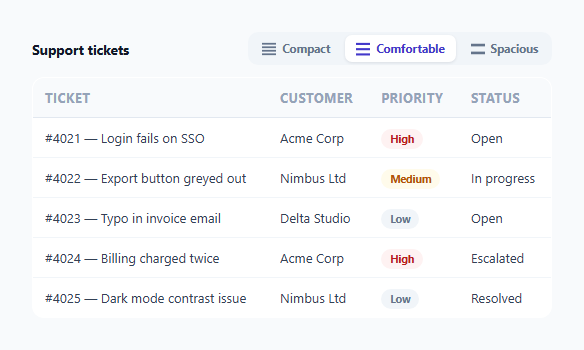
Power users scanning a long table often want to see as many rows as possible; casual or new users often prefer more breathing room and larger touch targets. Hardcoding one row height forces every user into the same tradeoff. This snippet implements a genuine three-way density switcher — compact, comfortable, spacious — that changes only vertical padding and font size, persists the user's choice, and is built as a properly accessible radio group rather than a set of plain buttons.
Why density changes padding and font-size, never column structure
Every density mode in the CSS touches exactly two properties: padding and font-size. Nothing about column widths, the number of visible columns, or cell content changes between modes — density is purely about *vertical rhythm*, not information density in the sense of hiding or showing data. This distinction matters: a density toggle that also reflows columns would be confusing (users switching for more visible rows shouldn't also lose or gain data), so the CSS is scoped tightly to just the properties that make rows taller or shorter.
Built as a real radio group, not three plain buttons
The three density buttons live inside a container with role="radiogroup", and each button carries role="radio" with aria-checked toggled to reflect the current selection. This isn't just a cosmetic ARIA addition — a density choice is inherently mutually exclusive (exactly one mode is active at a time), which is precisely the semantic a radio group communicates to assistive technology; a screen reader user tabbing to this control hears "radio group, row density" and can navigate the three mutually-exclusive options accordingly, rather than being told three unrelated buttons exist with no indication of their relationship or which one is currently active.
Persisting through localStorage, defensively
applyDensity() writes the chosen density to localStorage on every change, and the page reads it back on load to restore the same preference. Both the write and the read are wrapped in try/catch — localStorage can throw in contexts like private browsing with storage disabled, and a persistence failure in that edge case should degrade gracefully (density switching still works for the current session) rather than throwing an uncaught error that could break the rest of the page's script execution.
Validating the stored value before trusting it
When restoring a stored density on load, the code checks that the retrieved string is actually one of the three valid density values before applying it (['compact','comfortable','spacious'].includes(stored)). This guards against a corrupted or manually-edited localStorage value (or a future version of the code that used different density names) silently producing a table with no matching CSS rule applied — falling back to 'comfortable' as a safe default whenever the stored value isn't recognized.
Build with AI
Build, Understand, Optimize, and Extend It With AI
Ask an AI assistant to explain why role="radiogroup"/role="radio" is the semantically correct accessibility pattern here rather than three independent buttons, and to discuss what specifically the try/catch around localStorage protects against. It's also worth asking for a version that adds a fourth "auto" density mode based on viewport height, or one that animates row height changes with a FLIP technique for a smoother visual transition than a plain CSS padding transition provides.
Prompt to recreate it
Copy this into your AI assistant of choice to build the effect from scratch, or as a jumping-off point for your own variant:
Build a table row density toggle in HTML, CSS, and vanilla JavaScript — no external library.

Requirements:
- A three-option control (Compact, Comfortable, Spacious) built with proper ARIA semantics: a container with role="radiogroup" and each option as an element with role="radio" and an aria-checked attribute that reflects which one is currently selected.
- Clicking an option applies a data-density attribute to a data table, and CSS rules scoped to that attribute change only the table cells' vertical padding and font-size — column widths and which data is visible must remain identical across all three modes.
- Persist the selected density to localStorage on every change, and restore it automatically when the page loads, defaulting to "comfortable" if nothing has been stored yet.
- Validate any value read back from localStorage against the three known-valid density names before applying it, falling back to the default if the stored value is missing or unrecognized.
- Wrap all localStorage reads and writes in try/catch so that a storage failure (such as in private browsing with storage disabled) never throws an uncaught error or breaks the density-switching feature itself — it should just not persist for that session.
- Include at least five rows of realistic table data so the visual difference between the three density modes is clearly demonstrated.
Want to tighten it up first? Run this prompt through the AI Prompt Studio to score it across 8 quality dimensions, catch anti-patterns, and tune the wording for Claude, ChatGPT, or Gemini before you paste it in.
Step by step
How to Use
- 1Click a density optionCompact, Comfortable, or Spacious — the table's row padding and font size change immediately, with no page reload.
- 2Reload the pageThe last-selected density is restored automatically from localStorage, so the preference persists across sessions.
- 3Tab to the density group with a keyboardEach button is a real role="radio" element with aria-checked reflecting state, giving screen reader users a properly announced mutually-exclusive control.
- 4Apply data-density to your own tableAdd the data-density attribute to any table element and copy the three CSS rule blocks, adjusting the padding/font-size values to your own design scale.
- 5Change the storage key if neededUpdate STORAGE_KEY in the JS if you have multiple density-togglable tables on the same site that should remember separate preferences.
Real-world uses
Common Use Cases
Got questions?
Frequently Asked Questions
No — density only changes vertical padding and font-size on every cell. Column widths, visible columns, and cell content are identical across all three modes; only the row height and text size change.
A density choice is inherently mutually exclusive — exactly one mode is active at a time — which is exactly the semantic role="radiogroup" and role="radio" communicate to screen readers. Plain buttons with no such roles would give a screen reader user no indication the three options are related or which one is currently selected.
Both the read and write to localStorage are wrapped in try/catch. If storage throws, density switching still works normally for the current page session — the preference just won't persist across a reload, and no error breaks the rest of the page.
The loaded value is checked against the known list of valid density names (compact/comfortable/spacious) before being applied. An unrecognized or corrupted value falls back to the "comfortable" default instead of applying a density with no matching CSS.
Yes — give each table its own STORAGE_KEY value so their density preferences are stored and restored independently rather than sharing one global preference.