Learn Coding Visually
Learn to code with interactive, live-preview playgrounds — HTML, CSS, JavaScript, React & more.
 HTML Playground42 lessons · Click-based · Live preview
 CSS PlaygroundLearn CSS with a live editor
 JavaScript Playground60 lessons · DOM · Async · Canvas
 React PlaygroundLearn React with a live code editor
 GSAP PlaygroundLearn GSAP animation interactively
 SVG Playground44 lessons · shapes · paths · animation
 SCSS Playground45 lessons · Sass modules · tokens
 Tailwind PlaygroundLearn Tailwind CSS with a live editor
 Bootstrap 5 Playground50 lessons · live preview
Inline Cell Bulk-Edit Table — contenteditable Cells with a Floating Save Bar
Inline Cell Bulk-Edit Table — Floating Save Bar · Tables · Plain HTML, CSS & JS · Live preview
What's included
Features
About this UI Snippet
Inline Bulk-Edit Table — Per-Cell Editing with a Batched Save Bar
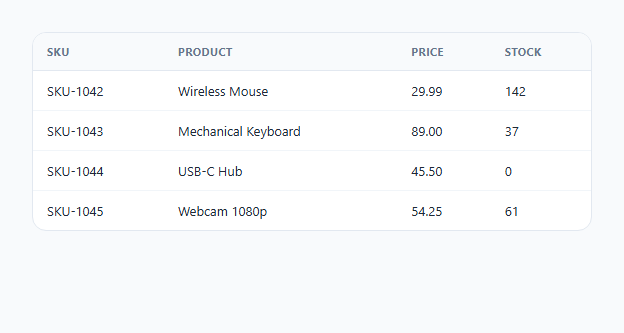
Most editable-table patterns fall into two camps: a full "edit mode" toggle that locks the whole row, or a modal that opens per-row for editing one record at a time. This snippet takes a third approach that scales better for quick multi-field corrections: every cell is directly editable via contenteditable, and a floating save bar tracks how many cells have changed across the *entire table* — not just one row — letting a user fix several fields in several different rows and commit them all as one batch.
Tracking dirty state per cell, not per row
On load, every .cell element's original text is captured into a Map keyed by the DOM node itself: originalValues.set(cell, cell.textContent). On every input event, the current text is compared back against that stored original — if they differ, the cell gets a .dirty class (a small amber dot and background tint); if a user types something and then types it back to the original value, the dirty state clears automatically, since the comparison is against the *original* value, not "has this cell ever been touched."
Why the save bar counts cells, not rows
updateBar() queries .cell.dirty across the whole table and shows that count in the floating bar — "3 unsaved changes" might mean three fields in one row, or one field each in three different rows. This framing matches how someone actually works through a spreadsheet-like table: fixing individual field values here and there rather than deciding to edit specific whole rows.
Committing vs discarding
"Save changes" copies every dirty cell's current text back into the originalValues map and clears its dirty flag — in a real integration, this is also where a batched PATCH request to a backend would fire before clearing the flags. "Discard" does the reverse: it resets every dirty cell's textContent back to the value stored in the map, immediately reverting all unsaved edits table-wide with a single click.
Enter to confirm, not to insert a newline
Because table cells are single-line values, the keydown handler intercepts Enter and calls .blur() on the focused cell instead of letting contenteditable insert a line break — so pressing Enter reads naturally as "I'm done editing this cell" rather than corrupting the value with an embedded newline.
Build with AI
Build, Understand, Optimize, and Extend It With AI
Ask an AI assistant to explain why tracking dirty state per cell in a Map keyed by the DOM node scales cleanly to a table with many rows and columns, compared to alternatives like storing dirty state on the row or diffing the whole table's HTML on every keystroke. It's also worth asking for a version that adds keyboard cell-to-cell navigation with Tab/Shift+Tab/arrow keys, or one that shows a live diff (old value struck through) inside dirty cells before saving.
Prompt to recreate it
Copy this into your AI assistant of choice to build the effect from scratch, or as a jumping-off point for your own variant:
Build an inline bulk-edit data table in HTML, CSS and vanilla JavaScript where individual cells are directly editable and a floating save bar tracks unsaved changes across the whole table — no external libraries.

Requirements:
- A table where designated cells use contenteditable="true" while other columns (like an ID column) remain plain, read-only text.
- On page load, capture every editable cell's original text value so later edits can be compared against it.
- As a user edits a cell, visually mark it "dirty" the instant its content differs from its original value, and automatically clear that dirty state if the user types the original value back.
- A floating save bar, hidden by default, that appears once at least one cell is dirty and shows a live count of dirty cells across the entire table (not per row).
- A Save button in the bar that commits all dirty cells at once (updating their stored "original" value and clearing dirty state) and a Discard button that reverts all dirty cells back to their original values in one action.
- Pressing Enter while editing a cell should confirm/blur the cell rather than insert a line break.
Want to tighten it up first? Run this prompt through the AI Prompt Studio to score it across 8 quality dimensions, catch anti-patterns, and tune the wording for Claude, ChatGPT, or Gemini before you paste it in.
Step by step
How to Use
- 1Mark editable cells with class="cell" contenteditable="true"Add a data-field attribute for identification, and .num for numeric columns that should use tabular figures.
- 2Leave non-editable columns as plain <td>The SKU column in the demo has no .cell class, so it stays read-only while adjacent cells remain editable.
- 3Add or remove rows freelyAny new .cell elements are automatically picked up by the initial originalValues.forEach loop as long as the script runs after the table is in the DOM.
- 4Wire the save button to your APIInside the saveBtn click handler, collect the dirty cells' row and field before clearing dirty state, and send them as a single batched PATCH request.
- 5Customize the dirty-cell indicatorAdjust the .cell.dirty background and ::after dot styling in the CSS panel to match your product's existing "unsaved" visual language.
Real-world uses
Common Use Cases
Got questions?
Frequently Asked Questions
contenteditable keeps the table's exact visual layout and column widths intact with no layout shift when entering or leaving edit mode, and every cell is simultaneously editable without a separate click-to-activate step per cell.
Each cell's starting text is captured into a Map keyed by the DOM node on load. Every input event compares the live textContent back against that stored value — if they match again (e.g. the user typed then undid their change), the dirty flag clears automatically.
Every cell currently marked dirty has its textContent reset to the value stored in the originalValues map, and its dirty class is removed — reverting all unsaved edits across the whole table in one action.
Yes — add validation inside the input handler (or right before the save loop) that checks a cell's data-field and content, and either block the save or flag the cell with an additional error class if invalid.
Not directly — contenteditable cells accept any text, so add your own numeric validation for .num cells if you need to guarantee only valid numbers are entered.
Inside the saveBtn click handler, before clearing dirty flags, collect each dirty cell's closest tr[data-row] id and data-field name plus its new textContent into a batch array, then send that array as one request instead of one request per field.