Learn Coding Visually
Learn to code with interactive, live-preview playgrounds — HTML, CSS, JavaScript, React & more.
 HTML Playground42 lessons · Click-based · Live preview
 CSS PlaygroundLearn CSS with a live editor
 JavaScript Playground60 lessons · DOM · Async · Canvas
 React PlaygroundLearn React with a live code editor
 GSAP PlaygroundLearn GSAP animation interactively
 SVG Playground44 lessons · shapes · paths · animation
 SCSS Playground45 lessons · Sass modules · tokens
 Tailwind PlaygroundLearn Tailwind CSS with a live editor
 Bootstrap 5 Playground50 lessons · live preview
Table Column Visibility Toggle Menu — Real Dynamic Show/Hide Columns
Table Column Visibility Toggle Menu · Tables · Plain HTML, CSS & JS · Live preview
What's included
Features
About this UI Snippet
Table Column Visibility Toggle — Actually Adding and Removing Columns
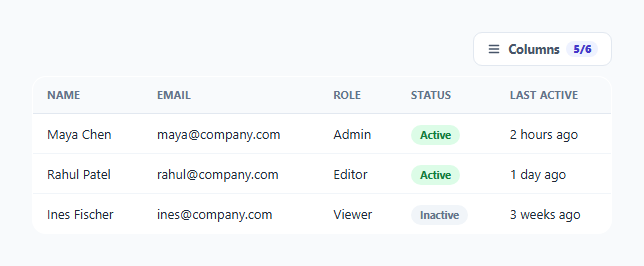
A "columns" menu is only useful if unchecking a box genuinely removes that column from the table — header and every row's matching cell together — rather than just visually greying out a menu item with no real effect. This snippet implements the real behavior: each checkbox is wired to a shared data-col identifier that both the header cell and every body cell in that column carry, so one toggle hides or reveals an entire column consistently across the whole table.
One data attribute links a checkbox to its entire column, header included
Every column that can be hidden has a data-col value — email, role, status, and so on — applied to *both* its <th> and every <td> in that column across every row. The checkbox controlling it carries the same value in its own data-col attribute. applyVisibility() reads each checkbox's data-col, then runs a single table.querySelectorAll([data-col="${col}"]) scoped to the whole table — which matches the header cell *and* every row's cell for that column in one query, applying the same .col-hidden toggle to all of them together, so a column can never end up with its header hidden but its body cells still showing, or vice versa.
The "Name" column is intentionally not toggleable
The first column (Name) has no data-col attribute and no matching checkbox — it's structurally exempt from the hide/show system entirely, modeling the realistic constraint that a table needs at least one identifying column always visible to remain meaningful; hiding every other column while keeping Name visible still leaves a usable, if minimal, table.
The visible-column counter accounts for that always-visible column explicitly
colCount.textContent computes ${visibleCount + 1}/${totalCount + 1} — adding 1 to both the numerator and denominator specifically to account for the always-visible Name column, which isn't represented in the checkboxes array at all. Getting this off-by-one right matters for the badge to honestly report "6/6" when everything is visible, rather than under-reporting "5/5" and omitting the one column that was never optional in the first place.
Dropdown menu behavior follows the same conventions as this library's other menus
The columns button toggles aria-expanded and a .open class on the dropdown, and a document-level click listener closes the menu whenever a click lands outside .col-menu-wrap — standard, predictable dropdown-menu behavior that doesn't require re-learning for anyone who's used a similar menu elsewhere in a product.
Build with AI
Build, Understand, Optimize, and Extend It With AI
Ask an AI assistant to explain why sharing one data-col attribute between a checkbox, a header cell, and every row's matching cell is what guarantees header and body visibility can never fall out of sync, compared to an approach that toggled header and body cells through separate, independently-tracked logic. It's also worth asking for a version that persists column visibility preferences to localStorage across reloads, or one that also supports reordering visible columns via drag-and-drop in the same dropdown menu.
Prompt to recreate it
Copy this into your AI assistant of choice to build the effect from scratch, or as a jumping-off point for your own variant:
Build a data table with a column visibility toggle menu in HTML, CSS and vanilla JavaScript, where checkboxes genuinely show and hide entire table columns — no external table/grid library.

Requirements:
- A table with one always-visible identifying column (e.g. Name) and several other columns, each of which can be independently shown or hidden.
- A dropdown "Columns" button revealing a menu of checkboxes, one per optional column, where each checkbox and its column's header cell plus every row's corresponding cell all share a single common identifying attribute (e.g. a matching data attribute value).
- Toggling a checkbox must hide or show that column's header cell AND every row's matching cell together in one operation, so the two can never end up out of sync with each other — implement this as a single query that matches all cells sharing that column's identifier, not separate logic for header versus body cells.
- Display a small counter (e.g. "5/6") showing how many columns are currently visible out of the total, correctly accounting for the always-visible identifying column that has no checkbox of its own.
- The dropdown menu must close when clicking anywhere outside of it, and its trigger button must have an accurate aria-expanded attribute reflecting whether the menu is currently open.
- Ensure the solution generalizes to adding a new optional column without needing to write any additional per-row JavaScript wiring.
Want to tighten it up first? Run this prompt through the AI Prompt Studio to score it across 8 quality dimensions, catch anti-patterns, and tune the wording for Claude, ChatGPT, or Gemini before you paste it in.
Step by step
How to Use
- 1Click "Columns" and toggle any checkboxWatch the corresponding column's header and every row's cell for that column hide or reveal together, immediately.
- 2Add a new toggleable columnGive the new <th> and every matching <td> the same new data-col value, and add a matching checkbox with that same value in the menu.
- 3Keep an identifying column always visibleLeave your primary identifying column (like Name here) without a data-col attribute so it's structurally exempt from being hidden.
- 4Persist the visibility state (optional)Save each checkbox's checked state to localStorage on change, and restore it before the initial applyVisibility() call, so a user's column preferences survive a reload.
- 5Adjust which columns start hidden by defaultRemove the checked attribute from any checkbox in the HTML to have that column start hidden.
Real-world uses
Common Use Cases
Got questions?
Frequently Asked Questions
It genuinely hides the column — both the header cell and every row's corresponding cell get display:none applied via a shared .col-hidden class, driven by a single data-col attribute shared between the checkbox and every cell in that column, so the column's space is fully reclaimed by the table layout, not just dimmed.
No — both are toggled together in the exact same operation, since applyVisibility() queries table.querySelectorAll([data-col="${col}"]) scoped to the whole table, which matches the header cell and every row's cell for that column in one pass and applies the identical class change to all of them.
It deliberately has no data-col attribute and no matching checkbox, modeling the realistic requirement that a table keeps at least one identifying column always visible — hiding every other column should still leave a minimally usable table, not an empty one.
The counter explicitly adds 1 to both the visible count and the total count to account for the always-visible Name column, which has no checkbox representing it at all — without that adjustment, the badge would misleadingly under-report the true number of visible and total columns.
Add a data-col attribute with a new unique value to the new column's <th> and to every row's matching <td>, then add a corresponding checkbox with that same data-col value inside the menu — applyVisibility() picks it up automatically since it iterates over whatever checkboxes currently exist in the menu.
Not by default in this snippet — checkbox states reset to their HTML-defined defaults on reload. Add localStorage reads/writes around each checkbox's checked state if you want a user's column preferences to persist.