Learn Coding Visually
Learn to code with interactive, live-preview playgrounds — HTML, CSS, JavaScript, React & more.
 HTML Playground42 lessons · Click-based · Live preview
 CSS PlaygroundLearn CSS with a live editor
 JavaScript Playground60 lessons · DOM · Async · Canvas
 React PlaygroundLearn React with a live code editor
 GSAP PlaygroundLearn GSAP animation interactively
 SVG Playground44 lessons · shapes · paths · animation
 SCSS Playground45 lessons · Sass modules · tokens
 Tailwind PlaygroundLearn Tailwind CSS with a live editor
 Bootstrap 5 Playground50 lessons · live preview
Staggered Reveal on Scroll — Correct Batch Ordering with IntersectionObserver
Staggered Reveal on Scroll — IntersectionObserver, One Timer · Scroll · Plain HTML, CSS & JS · Live preview
What's included
Features
About this UI Snippet
Staggered Scroll Reveal — Getting Batch Order and Timing Right
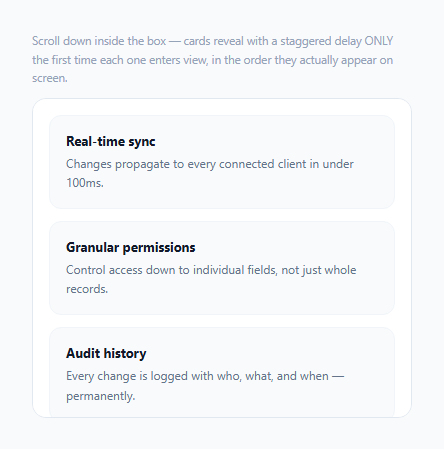
A staggered reveal-on-scroll effect — where list items fade in one after another rather than all at once — is a common, tasteful touch, but a naive implementation has a subtle bug: when a user scrolls fast enough that several elements cross into view within the same animation frame, IntersectionObserver's callback receives all of them in a single entries array, and that array's order is not guaranteed to match their actual top-to-bottom visual order on screen. This snippet fixes that by explicitly sorting each batch before applying the stagger delay.
Why the entries array can't be trusted for visual ordering
IntersectionObserver reports every element whose intersection state changed since the last check, batched into one callback call — but the order of that entries array reflects internal observation bookkeeping, not necessarily the elements' visual top-to-bottom order. On a fast scroll where three or four cards cross the visibility threshold within the same tick, revealing them in whatever order entries happens to list them could easily animate the *third* card before the *first* — visually jarring and the opposite of what a "staggered top-to-bottom reveal" is supposed to look like.
Sorting by a stored index, not relying on DOM traversal at animation time
Each card carries a data-index attribute matching its actual position in the list. The observer callback filters down to just the entries that newly intersected, then explicitly .sort()s them by that numeric index before applying any stagger delay. This guarantees that whatever batch of cards enters view together, they always animate in true top-to-bottom order relative to *each other* — regardless of what order the browser happened to report them in internally.
The stagger delay is relative to the batch, not the element's absolute position
setTimeout(..., i * STAGGER_STEP_MS) uses i, the card's index *within the current batch* (after sorting) — not its absolute data-index in the full six-card list. This distinction matters: if a user scrolls slowly and only one card enters view at a time, that card should reveal immediately with no artificial delay (batch size of one, i = 0), not wait for a delay proportional to its absolute position in a much longer list. The stagger effect should only apply *relative to other cards entering at the same moment*, not accumulate across the whole page.
`unobserve()` makes this a genuine one-time reveal, not a re-triggering animation
The moment a card is scheduled to reveal, the code calls observer.unobserve(card) — removing it from further observation entirely. Without this, scrolling a revealed card back out of view and then back in would re-trigger isIntersecting: true again, replaying the fade-in animation every single time, which reads as a distracting, repetitive effect rather than the intended one-time "welcome to this content" reveal.
Build with AI
Build, Understand, Optimize, and Extend It With AI
Ask an AI assistant to explain in detail why IntersectionObserver's entries array order isn't guaranteed to match visual DOM order, with a concrete example of a fast scroll producing an out-of-order batch, and why sorting by a stored index before staggering fixes it. It's also worth asking for a version that reveals items in a CSS grid (where "visual order" also depends on column position, not just a single vertical index), or one that adds a slight random jitter to the stagger delay for a less mechanically uniform reveal feel.
Prompt to recreate it
Copy this into your AI assistant of choice to build the effect from scratch, or as a jumping-off point for your own variant:
Build a staggered scroll-reveal animation for a list of cards in HTML, CSS, and vanilla JavaScript using IntersectionObserver — no scroll event listener, no external animation library.

Requirements:
- A vertically scrollable container with at least six cards, each starting invisible (opacity 0, slightly translated) and fading/sliding into view once scrolled into the viewport.
- Use one IntersectionObserver watching all the cards. Each card must carry a stored numeric index reflecting its true top-to-bottom position in the list.
- Whenever the observer's callback fires with multiple cards having newly entered the viewport within the same batch (simulating what happens on a fast scroll), the reveal animation must stagger them in CORRECT top-to-bottom visual order — explicitly sort the batch of newly-intersecting entries by their stored index before applying any stagger delay, since the raw order IntersectionObserver reports entries in is not guaranteed to match visual order.
- The stagger delay applied to each card in a batch must be based on that card's position WITHIN the current batch (so a card entering alone gets zero artificial delay), not on its absolute position in the full list of cards.
- Once a card has been revealed, it must stop being observed so that scrolling it back out of view and then back into view again does NOT replay its reveal animation — this must be a genuine one-time-per-card effect.
- Make the stagger delay amount and the visibility threshold both easily adjustable via named constants/options.
Want to tighten it up first? Run this prompt through the AI Prompt Studio to score it across 8 quality dimensions, catch anti-patterns, and tune the wording for Claude, ChatGPT, or Gemini before you paste it in.
Step by step
How to Use
- 1Scroll slowly inside the boxCards reveal one at a time with no artificial delay between them, since each enters its own separate observer batch.
- 2Scroll quickly, several cards at onceMultiple cards enter the same batch and stagger their reveal relative to each other, always in correct top-to-bottom order regardless of how the browser internally reported them.
- 3Scroll a revealed card back out and then back into viewIt stays visible and does not replay its animation — observer.unobserve() makes this a genuine one-time reveal, not a re-triggering effect.
- 4Adjust STAGGER_STEP_MSChange this constant to make the stagger delay between cards in the same batch faster or slower.
- 5Adjust the threshold optionChange 0.2 to control how much of a card must be visible before it counts as "entered" and becomes eligible for reveal.
Real-world uses
Common Use Cases
Got questions?
Frequently Asked Questions
The entries array's order reflects internal observation bookkeeping, not necessarily the elements' actual visual position on screen. On a fast scroll where several elements cross the visibility threshold within the same callback tick, their order in that array is not guaranteed to match their top-to-bottom order, which is why this pattern explicitly sorts by a stored index before staggering.
If the delay were based on absolute position, a single card entering view late in a long list (with nothing else nearby entering at the same time) would still wait an artificially long delay proportional to its position, rather than revealing immediately. Basing the delay on position within the CURRENT batch means a lone entering card always reveals instantly, and only cards entering together actually stagger relative to each other.
No — observer.unobserve(card) is called the moment a card is scheduled to reveal, permanently removing it from further observation. This makes the effect a genuine one-time "first view" reveal rather than something that replays every time the card happens to scroll in and out of the viewport again.
It sets how much of a card must actually be visible within the scroll container before IntersectionObserver reports it as intersecting — 0.2 means at least 20% of the card must be visible before it's eligible to be revealed, avoiding a reveal triggered by just a sliver of the card barely entering view.
All the cards that newly intersected since the last check arrive together in one entries array, get sorted into correct visual order, and stagger-reveal relative to each other using the same batch-relative delay logic — the pattern handles a large batch exactly the same way it handles a batch of one or two.
Remove the observer.unobserve(card) call, and additionally handle the entry.isIntersecting === false case by removing the "visible" class — this would turn it into a repeating scroll-in/scroll-out effect rather than a one-time reveal, though the batch-ordering and stagger-timing logic would remain unchanged.