Learn Coding Visually
Learn to code with interactive, live-preview playgrounds — HTML, CSS, JavaScript, React & more.
 HTML Playground42 lessons · Click-based · Live preview
 CSS PlaygroundLearn CSS with a live editor
 JavaScript Playground60 lessons · DOM · Async · Canvas
 React PlaygroundLearn React with a live code editor
 GSAP PlaygroundLearn GSAP animation interactively
 SVG Playground44 lessons · shapes · paths · animation
 SCSS Playground45 lessons · Sass modules · tokens
 Tailwind PlaygroundLearn Tailwind CSS with a live editor
 Bootstrap 5 Playground50 lessons · live preview
Shift-Click Range Select in a Table — Gmail/Sheets-Style Multi-Row Selection
Shift-Click Range Select in a Table (Gmail/Sheets-Style) · Tables · Plain HTML, CSS & JS · Live preview
What's included
Features
About this UI Snippet
Shift-Click Range Selection — The Anchor-Based Pattern Behind Sheets and Gmail
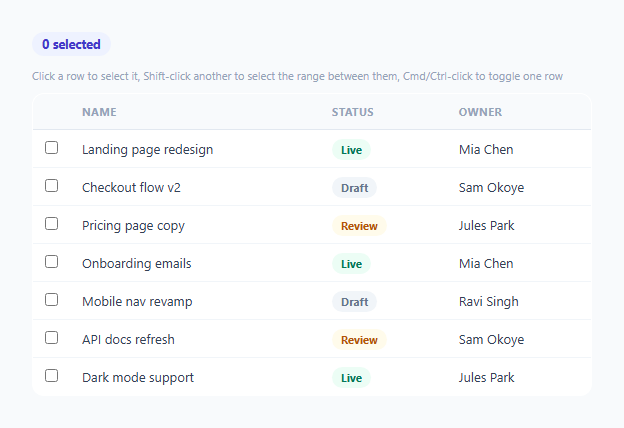
Most custom-built admin tables only support one selection mode: click a checkbox, one row at a time. Power users expect the selection behavior every spreadsheet and email client has trained them on for decades — plain click selects one row, Shift-click selects everything between that row and the last one clicked, and Cmd/Ctrl-click toggles a single row without disturbing the rest of the selection. This snippet implements all three modes correctly, built around the one concept that makes range selection possible: a persistent anchor.
What the anchor actually is
anchorIndex tracks the index of the last row clicked *without* the Shift modifier — not simply "the last row clicked" in general. This distinction is what makes range selection predictable: Shift-clicking always measures a range from that fixed anchor point, regardless of how many Shift-clicks happen afterward. Click row 2, Shift-click row 6 (selects 2–6), then Shift-click row 4 — the range recalculates as 2–4, not "extend from 6 to 4," because the anchor never moved during any of the Shift-click steps. This exactly matches how Sheets and Gmail behave, and is the detail most hand-rolled implementations get wrong by treating "last clicked row" and "anchor" as the same thing.
Why Shift-click replaces the selection instead of adding to it
selectRange() calls selected.clear() before filling in the new range — a fresh Shift-click always defines a brand-new contiguous selection from the anchor, discarding whatever was selected before. This mirrors real spreadsheet behavior: Shift-click is for *defining a range*, not *appending to an existing arbitrary selection* (that's what Cmd/Ctrl-click is for). Conflating the two would make it impossible to ever shrink a range back down after over-shooting it with a previous Shift-click.
Why Cmd/Ctrl-click moves the anchor, but plain click also moves it
Both the toggle path and the plain-click path update anchorIndex to the row that was just clicked — but Shift-click deliberately does not. This means a user can Cmd-click three unrelated rows, and if they then Shift-click a fourth, the range is measured from the *last Cmd-clicked row* (since that click updated the anchor), letting range and toggle selection compose naturally in the same interaction sequence, exactly as it does in real file managers and spreadsheets.
Checkboxes reflect state, they don't drive it
Every row's checkbox has tabindex="-1" and pointer-events: none in the CSS — they're rendered purely as a *visual reflection* of selected, not an independent interactive control a user could click directly. All selection logic lives in the row's own click handler, so there's exactly one source of truth for whether a row is selected, and the checkbox can never fall out of sync with the row's actual selection state.
Build with AI
Build, Understand, Optimize, and Extend It With AI
Ask an AI assistant to walk through exactly why the anchor must be distinct from "the last row clicked" and to trace through a multi-step example (click, shift-click, shift-click again) showing how the range recalculates each time. It's also worth asking for a touch-friendly companion pattern (long-press to enter a multi-select mode) so the same table works well on mobile where Shift/Ctrl modifiers don't exist, or for keyboard-only equivalent controls (Shift+Arrow to extend a range) for full accessibility.
Prompt to recreate it
Copy this into your AI assistant of choice to build the effect from scratch, or as a jumping-off point for your own variant:
Build a data table in HTML, CSS, and vanilla JavaScript implementing genuine Shift-click range selection and Cmd/Ctrl-click toggle selection, matching the behavior of Gmail, Google Sheets, and native file managers — no external library.

Requirements:
- A table of at least six rows, each with a checkbox that visually reflects (but is not itself directly clickable — pointer-events: none) whether that row is currently selected.
- Track a selection "anchor": the index of the last row clicked without any modifier key held, or via a Cmd/Ctrl-click. This anchor must NOT update on a Shift-click.
- A plain click on a row must clear the existing selection, select only that row, and set the anchor to it.
- A Cmd/Ctrl-click on a row must toggle only that row's selection on or off without touching any other currently-selected rows, and must update the anchor to the clicked row.
- A Shift-click on a row must clear the existing selection and select every row in the contiguous range between the current anchor and the clicked row (inclusive, working correctly whether the clicked row is before or after the anchor), without moving the anchor itself.
- Show a live count of currently selected rows in a toolbar above the table, updating immediately on every interaction.
- Visually distinguish selected rows from unselected ones, and give the current anchor row a distinct visual marker (like an outline) separate from the selected-background styling.
Want to tighten it up first? Run this prompt through the AI Prompt Studio to score it across 8 quality dimensions, catch anti-patterns, and tune the wording for Claude, ChatGPT, or Gemini before you paste it in.
Step by step
How to Use
- 1Click a rowSelects just that row and sets it as the anchor for any future Shift-click range.
- 2Shift-click a different rowSelects every row between the anchor and the clicked row, replacing the previous selection with this new contiguous range.
- 3Cmd/Ctrl-click a rowToggles just that one row on or off without disturbing the rest of the selection, and moves the anchor to it.
- 4Combine the twoCmd-click a few individual rows, then Shift-click another — the range is measured from the last Cmd-clicked row, letting the two modes compose naturally.
- 5Wire up bulk actionsRead the selected Set (or the checked checkboxes) to drive a bulk-action toolbar — the selection state is already fully tracked and ready to use.
Real-world uses
Common Use Cases
Got questions?
Frequently Asked Questions
The anchor is the last row clicked without holding Shift — it updates on a plain click or a Cmd/Ctrl-click, but not on a Shift-click. This is what lets repeated Shift-clicks recalculate a range from a stable, fixed point rather than accidentally chaining forward from whichever row was Shift-clicked most recently.
This matches how spreadsheets and file managers behave — Shift-click defines a fresh contiguous range from the anchor. If you want to add a separate non-contiguous row to an existing selection, that is what Cmd/Ctrl-click is for; combining both modifiers in sequence lets you compose ranges and individual toggles together.
Yes — Cmd-click a few individual rows first (each one becomes the new anchor as you go), then Shift-click another row: the range will be measured from the most recently Cmd-clicked row, letting you build up complex selections the same way a spreadsheet allows.
They have pointer-events: none and are purely a visual reflection of the selected Set — this guarantees there is exactly one source of truth for selection state (the row click handler), so the checkbox display can never fall out of sync with the actual selection.
The selected Set holds the currently selected row indices at any time — iterate it (or check each row's .selected class) to build a bulk-action payload referencing the underlying data for those rows.
Shift-click and Ctrl-click are keyboard-modifier-dependent and are primarily a desktop pattern. For touch, pair this with a long-press-to-enter-selection-mode pattern so mobile users have an equivalent way to multi-select without keyboard modifiers.