You Might Also Like
Learn Coding Visually
Learn to code with interactive, live-preview playgrounds — HTML, CSS, JavaScript, React & more.
 HTML Playground42 lessons · Click-based · Live preview
 CSS PlaygroundLearn CSS with a live editor
 JavaScript Playground60 lessons · DOM · Async · Canvas
 React PlaygroundLearn React with a live code editor
 GSAP PlaygroundLearn GSAP animation interactively
 SVG Playground44 lessons · shapes · paths · animation
 SCSS Playground45 lessons · Sass modules · tokens
 Tailwind PlaygroundLearn Tailwind CSS with a live editor
 Bootstrap 5 Playground50 lessons · live preview
CSS Scroll-Driven Animations: animation-timeline Explained
CSS Scroll-Driven Animations (animation-timeline) Explainer · Scroll · Plain HTML, CSS & JS · Live preview
What's included
Features
About this UI Snippet
CSS Scroll-Driven Animations — animation-timeline: scroll() and view() Without a Single Scroll Listener
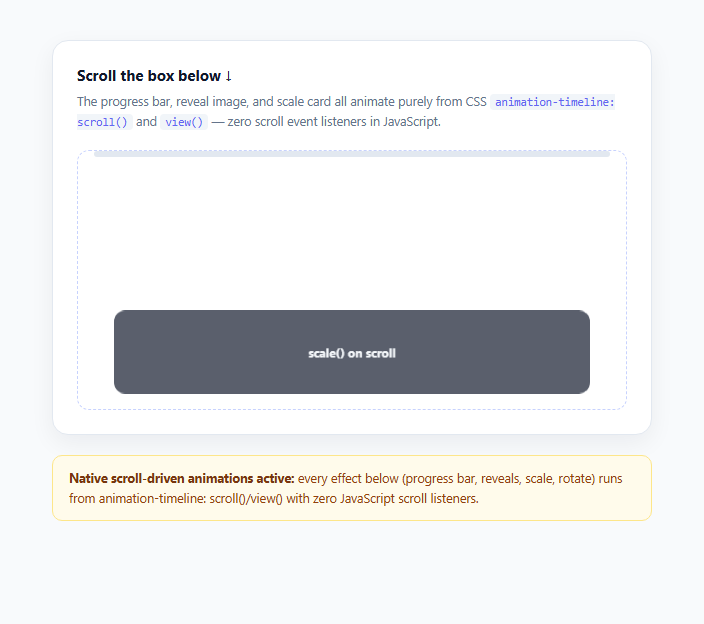
Scroll-linked effects — a progress bar that fills as you scroll, an image that fades in when it enters the viewport, a parallax card that scales as it passes through view — have almost always been built the same way: attach a scroll event listener, read window.scrollY or element.getBoundingClientRect() on every fired event, compute a percentage, and write the result into an inline style or CSS custom property, typically wrapped in requestAnimationFrame to avoid layout thrashing. The CSS Scroll-Driven Animations spec replaces that entire pipeline with two new native timeline types, scroll() and view(), that plug directly into the standard CSS animation property — no JavaScript execution on scroll at all.
`animation-timeline: scroll()` — progress through a scroller
By default, a CSS animation's progress is driven by time — 0% at animation-duration: 0s, 100% at the end. Setting animation-timeline: scroll() instead ties that same 0%-to-100% progress to how far a scrollable ancestor has been scrolled. The progress bar in this demo uses animation-timeline: scroll(nearest), which tells the browser "find the nearest scrollable ancestor and use its scroll position as the timeline" — in this case, the dashed-border .scroller box. The @keyframes grow-progress rule animates transform: scaleX(0) to scaleX(1), and instead of running over a fixed duration, the browser now maps that keyframe range directly onto 0%-100% of the scroller's scroll distance. Note animation-duration becomes irrelevant for a scroll-timeline-driven animation; only the keyframe percentages matter.
`animation-timeline: view()` — progress through the viewport
The reveal, scale, and rotate cards use the second timeline type, view(), which is subtly different: instead of tracking scroll distance through a container, it tracks how far the *animating element itself* has travelled through its nearest scrollable ancestor's visible area — effectively "is this element entering, centered in, or leaving the visible viewport of its scroller." This is the exact mechanism most scroll-reveal libraries (AOS, ScrollReveal, GSAP ScrollTrigger) reimplement in JavaScript, now available natively.
`animation-range` — controlling exactly when the animation plays
Pairing a view() timeline with animation-range lets you scope the 0%-100% animation progress to a specific portion of the element's transit through the viewport. This demo's reveal card uses animation-range: entry 0% cover 40%, meaning the keyframes play out entirely during the element's "entry" phase (from first becoming visible to being 40% scrolled past) — so it finishes revealing well before it reaches the vertical center, rather than animating the whole time it's on screen. The named range keywords are entry, contain, exit, cover, and entry-crossing/exit-crossing, each describing a different phase of the element's relationship to the scrollport.
Named scroll-timelines vs the anonymous shorthand
This demo uses the anonymous scroll()/view() function form for simplicity, but the spec also supports explicitly named timelines: declaring scroll-timeline-name: --my-timeline on the scroller and referencing animation-timeline: --my-timeline on a *different* element anywhere in the DOM (not just a descendant), which is useful when the element you want to animate isn't nested inside the scroller itself.
Browser support and the `@supports` fallback
animation-timeline shipped in Chromium-based browsers (Chrome/Edge 115+) first, with Safari and Firefox support arriving later — as of early 2026 it's usable in production behind a feature-detection fallback. This demo wraps a fallback in @supports not (animation-timeline: scroll()), which sets all animated elements to their final, fully-visible resting state (opacity: 1, transform: none, animation: none) so unsupported browsers see a clean static layout instead of permanently-hidden or half-animated content — this is the single most important detail to get right when shipping scroll-driven CSS today, since without it, elements would stay at their from keyframe state (often invisible) forever in a non-supporting browser.
Why this matters for 2025/2026 UI work
Because the browser owns the timeline calculation, scroll-driven CSS animations run off the main thread and stay perfectly smooth even during heavy JavaScript execution elsewhere on the page — a category of jank that plagued nearly every JS-based scroll-reveal implementation. It also means one less runtime dependency, one less bundle-size cost, and no risk of a scroll listener firing after its element has already been removed from the DOM.
Build with AI
Build, Understand, Optimize, and Extend It With AI
Paste this snippet's HTML, CSS, and JS into an AI coding assistant like Claude and ask it to explain exactly how animation-range: entry 0% cover 40% maps onto the .reveal-card's transit through the scroller, and why that produces a different timing than the .scale-card's cover 10% cover 50% range — walking through both side by side makes the range syntax click much faster than reading the spec alone. It's also worth asking the assistant to add a named scroll-timeline example (scroll-timeline-name plus a separate animation-timeline reference) to show the alternative to the anonymous scroll()/view() functions used throughout this demo. You could also ask it to explain precisely why the @supports not (animation-timeline: scroll()) fallback block is necessary — specifically what would visually happen to the reveal card in an unsupported browser if that block were deleted.
Prompt to recreate it
Copy this into your AI assistant of choice to build the effect from scratch, or as a jumping-off point for your own variant:
Build an educational explainer of native CSS scroll-driven animations (animation-timeline: scroll() and view()) in plain HTML, CSS, and JavaScript.

Requirements:
- A self-contained scrollable box (overflow-y: auto on an internal container, not the page body) containing several stacked cards with generous vertical spacing so each one requires actual scrolling to reach.
- A thin progress bar above the scrollable box whose fill width animates from 0% to 100% using animation-timeline: scroll(nearest) tied to that internal scroller, implemented as a standard @keyframes animation transitioning a transform: scaleX() value, with animation-duration left irrelevant since the scroll timeline governs progress instead.
- At least two or three cards inside the scroller that each animate into view using animation-timeline: view(), each with a distinct animation-range (for example entry 0% cover 40% versus cover 10% cover 50%) so the demo visibly shows how animation-range changes when an effect plays relative to the element's transit through the visible area.
- Each scroll-driven card should animate a different visual property for variety: one an opacity+translateY reveal, one a scale() pop, one a rotate()+scale() combination.
- A mandatory @supports not (animation-timeline: scroll()) fallback block in the CSS that resets every scroll-driven element to its final, fully-visible resting state (opacity 1, no transform, animation: none) so the demo degrades gracefully instead of leaving elements stuck invisible in unsupported browsers.
- A small JavaScript feature-detection check using CSS.supports('animation-timeline', 'scroll()') and CSS.supports('animation-timeline', 'view()') that displays which timeline types the current browser actually supports — this must be the ONLY JavaScript in the demo; there must be no scroll event listener, no requestAnimationFrame loop, and no manual reading of scrollTop anywhere.
- Clear code comments explicitly noting that no scroll listener exists and that all animation timing is delegated to the browser's native scroll-timeline implementation.
Want to tighten it up first? Run this prompt through the AI Prompt Studio to score it across 8 quality dimensions, catch anti-patterns, and tune the wording for Claude, ChatGPT, or Gemini before you paste it in.
Step by step
How to Use
- 1Scroll the dashed boxScroll inside the .scroller container (not the page itself — this uses an internal overflow: auto box). As you scroll, the thin indigo progress bar above it grows from 0 to full width purely via animation-timeline: scroll(nearest) with no JavaScript reading the scroll position.
- 2Watch the reveal card animate inThe purple "opacity + translateY reveal" card starts invisible and slides up into place as it enters the scroller's visible area. It uses animation-timeline: view() combined with animation-range: entry 0% cover 40%, so the reveal completes early in its transit rather than animating the whole time it's visible.
- 3Compare the scale and rotate cardsThe dark "scale() on scroll" card and the green "rotate() on scroll" card each use view() with a different animation-range, showing how the same timeline type can be scoped to different phases of an element's scroll transit to produce distinctly timed effects.
- 4Check the live support bannerThe amber panel below the demo runs CSS.supports("animation-timeline", "scroll()") and CSS.supports("animation-timeline", "view()") in JavaScript and reports whether your current browser is actually running the native scroll-driven animations or falling back to the static @supports not (...) CSS block.
- 5Open devtools to inspect the timeline propertiesSelect the .progress-bar or .reveal-card element in your browser's devtools and look at the Animations panel (Chrome DevTools has dedicated scroll-timeline visualization) to see the live progress value update in real time as you scroll, without a single console.log needed.
- 6Apply the pattern to your own scroll effectsAdd animation-timeline: scroll() to any element inside an overflow: auto container for a progress-style effect, or animation-timeline: view() plus animation-range for a reveal-style effect on elements inside a normal page scroll — always pair it with an @supports not (animation-timeline: scroll()) fallback block so the animation's "from" state doesn't get stuck permanently in unsupported browsers.
Real-world uses
Common Use Cases
Got questions?
Frequently Asked Questions
scroll() ties an animation's 0%-100% progress to how far a scrollable container has been scrolled overall — it answers "how far through this scroller are we." view() instead ties progress to how far the specific animating element has travelled through its scroller's visible area — it answers "how far has this particular element travelled through the viewport," which is what you want for per-element reveal effects rather than a single global progress bar.
For the animation mechanics themselves, no — animation-timeline: scroll()/view() combined with standard @keyframes and animation-range handles the entire effect in CSS. This demo's only JavaScript is a small feature-detection check using CSS.supports() purely to display a support-status message to the viewer; it never listens to the scroll event or drives any visual change itself.
Without a fallback, an element whose animation's "from" keyframe is invisible (opacity: 0) would stay invisible forever in an unsupported browser, since the timeline that's meant to drive it never advances. This demo guards against that with @supports not (animation-timeline: scroll()) { ... }, which explicitly resets every animated element to its natural, fully-visible final state and disables the animation property entirely when the feature isn't supported.
These keywords describe named phases of an element's transit through the scrollport when using a view() timeline: entry is while the element is first scrolling into view, contain is while it's fully contained within the scrollport, exit is while it's scrolling out, and cover spans the element's entire visible duration from first pixel visible to last pixel visible. Combining a keyword with a percentage, like entry 0% cover 40% used in this demo's reveal card, scopes the animation's 0%-100% progress to exactly that sub-range of the full transit.
Yes, using named timelines: declare scroll-timeline-name: --my-timeline (or view-timeline-name: --my-timeline) on the scrolling container, then reference animation-timeline: --my-timeline on any other element in the document, even one that isn't a descendant of the scroller. This demo uses the simpler anonymous scroll()/view() function form instead, which implicitly targets the nearest ancestor scroller and only works for elements inside it.