


Learn Coding Visually
Learn to code with interactive, live-preview playgrounds — HTML, CSS, JavaScript, React & more.
 HTML Playground42 lessons · Click-based · Live preview
 CSS PlaygroundLearn CSS with a live editor
 JavaScript Playground60 lessons · DOM · Async · Canvas
 React PlaygroundLearn React with a live code editor
 GSAP PlaygroundLearn GSAP animation interactively
 SVG Playground44 lessons · shapes · paths · animation
 SCSS Playground45 lessons · Sass modules · tokens
 Tailwind PlaygroundLearn Tailwind CSS with a live editor
 Bootstrap 5 Playground50 lessons · live preview
OAuth Consent Screen with Granular Permission Scopes — Grant Exactly What You Mean To
OAuth Consent Screen — Granular Permission Scopes · Misc · Plain HTML, CSS & JS · Live preview
What's included
Features
About this UI Snippet
Granular OAuth Consent — Letting Users Grant Exactly the Permissions They Mean To
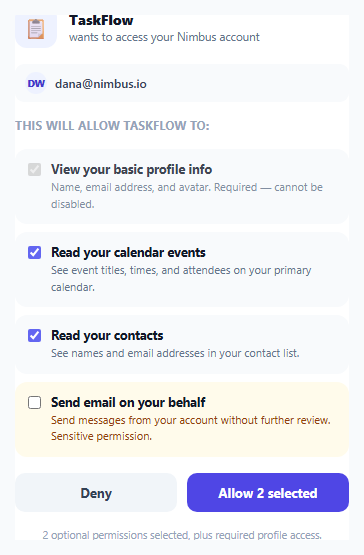
Most OAuth consent screens present a single all-or-nothing "Allow" button covering an entire bundle of requested permissions — accept the whole list, or deny the app access altogether. This snippet implements a more respectful pattern: each *optional* scope can be individually unchecked before granting, and only the one genuinely non-negotiable scope (basic profile info, needed simply to know who's authorizing) is locked as required.
Required versus optional scopes are visually and functionally distinct
The basic-profile-info checkbox is rendered checked disabled — visually similar to the other rows but unmistakably non-interactive (slightly dimmed, no pointer cursor on its label), with explicit copy stating it's required and cannot be disabled. Every other scope is a genuinely live, user-controllable checkbox. This distinction matters: conflating "things this app minimally needs to function" with "things this app would merely like to have access to" into one identical-looking list either forces users to accept more than they're comfortable with, or makes even the truly essential permission feel deniable when it isn't.
The sensitive scope is visually flagged, not just listed identically to the rest
The "Send email on your behalf" scope sits in a row styled with a distinct amber background and explicitly labeled "Sensitive permission" in its description — a deliberate visual escalation signaling this specific permission carries meaningfully more risk than read-only calendar or contacts access. Real OAuth providers (Google's consent screen among them) make exactly this kind of severity distinction, because burying a genuinely risky permission in a visually uniform list of low-risk ones makes it easy for a user to grant something they wouldn't have if it had been called out.
The Allow button's own label reflects the live selection, not a static caption
updateSummary() runs on every checkbox change and rewrites both the footnote text and the Allow button's own label to state exactly what's about to be granted — "Allow 2 selected" or "Allow (profile only)" if every optional scope has been unchecked. This is a deliberate anti-ambiguity measure: a user should never have to infer what clicking Allow will actually authorize from a static, unchanging button caption while the checkboxes above it have changed.
The granted-scopes payload is read live at the moment of the click
The click handler builds its grantedScopes array by filtering the checkboxes for their *current* checked state at the exact moment Allow is clicked — not from some earlier cached selection. This guarantees the authorization request sent (in a real implementation, to the actual OAuth backend) always matches precisely what the user was looking at and had selected the instant they committed to it.
Build with AI
Build, Understand, Optimize, and Extend It With AI
Ask an AI assistant to discuss why bundling all requested permissions into a single all-or-nothing consent action is a worse pattern for user trust than granular, individually-toggleable scopes, and what UX research or real platforms (like Google's OAuth consent screen) suggest about visually distinguishing sensitive permissions. It's also worth asking for a version that groups scopes into categories with a "select all in category" toggle, or one that shows a live preview of exactly what data the app would be able to see based on the currently selected scopes.
Prompt to recreate it
Copy this into your AI assistant of choice to build the effect from scratch, or as a jumping-off point for your own variant:
Build an OAuth-style consent screen with granular, individually-toggleable permission scopes in HTML, CSS, and vanilla JavaScript — no external library.

Requirements:
- A card showing the requesting application's name and icon, the account being authorized, and a list of at least four permission scopes it's requesting.
- Exactly one scope (basic profile information) must be required: rendered as a checked, disabled checkbox with copy explicitly stating it cannot be disabled. Every other scope must be a genuinely interactive, individually toggleable checkbox, checked by default except for the one sensitive scope described below.
- At least one scope must represent a higher-risk permission (such as "send email on your behalf") and must be visually distinguished from the other, lower-risk scopes — a different background color and explicit "sensitive" labeling in its description — and must be unchecked by default rather than pre-selected.
- An Allow button whose own visible label updates live to state exactly how many optional permissions are currently selected (distinguishing between "profile only" if none are selected and a specific count otherwise), and a summary line beneath it doing the same.
- Clicking Allow must build its list of granted permissions by reading the live, current checked state of every optional scope checkbox at the exact moment of the click — not a cached or default selection — and should visibly confirm the grant occurred.
- A separate Deny button must always be available and must not grant any permissions regardless of which optional scopes are currently checked.
Want to tighten it up first? Run this prompt through the AI Prompt Studio to score it across 8 quality dimensions, catch anti-patterns, and tune the wording for Claude, ChatGPT, or Gemini before you paste it in.
Source Code
<div class="demo">
  <div class="consent-card">
    <div class="consent-app">
      <div class="consent-app-icon">📋</div>
      <div>
        <p class="consent-app-name">TaskFlow</p>
        <p class="consent-app-desc">wants to access your Nimbus account</p>
      </div>
    </div>

    <div class="consent-account">
      <span class="consent-avatar">DW</span>
      <span>dana@nimbus.io</span>
    </div>

    <p class="consent-section-title">This will allow TaskFlow to:</p>
    <ul class="scope-list" id="scopeList">
      <li class="scope-item required">
        <label>
          <input type="checkbox" checked disabled />
          <div>
            <span class="scope-name">View your basic profile info</span>
            <span class="scope-desc">Name, email address, and avatar. Required — cannot be disabled.</span>
          </div>
        </label>
      </li>
      <li class="scope-item">
        <label>
          <input type="checkbox" data-scope="calendar" checked />
          <div>
            <span class="scope-name">Read your calendar events</span>
            <span class="scope-desc">See event titles, times, and attendees on your primary calendar.</span>
          </div>
        </label>
      </li>
      <li class="scope-item">
        <label>
          <input type="checkbox" data-scope="contacts" checked />
          <div>
            <span class="scope-name">Read your contacts</span>
            <span class="scope-desc">See names and email addresses in your contact list.</span>
          </div>
        </label>
      </li>
      <li class="scope-item risky">
        <label>
          <input type="checkbox" data-scope="send-email" />
          <div>
            <span class="scope-name">Send email on your behalf</span>
            <span class="scope-desc">Send messages from your account without further review. Sensitive permission.</span>
          </div>
        </label>
      </li>
    </ul>

    <div class="consent-actions">
      <button class="btn ghost" id="denyBtn">Deny</button>
      <button class="btn primary" id="allowBtn">Allow selected</button>
    </div>
    <p class="consent-footnote" id="consentFootnote">2 optional permissions selected, plus required profile access.</p>
  </div>
</div>
* { box-sizing: border-box; margin: 0; padding: 0; }
body { font-family: system-ui, sans-serif; background: #f8fafc; display: flex; align-items: center; justify-content: center; min-height: 100vh; padding: 24px; }
.demo { width: 380px; max-width: 100%; }
.consent-card { background: #fff; border: 1px solid #e2e8f0; border-radius: 18px; padding: 22px; display: flex; flex-direction: column; gap: 16px; box-shadow: 0 12px 30px rgba(15,23,42,0.06); }
.consent-app { display: flex; align-items: center; gap: 12px; }
.consent-app-icon { width: 42px; height: 42px; border-radius: 12px; background: #eef2ff; display: flex; align-items: center; justify-content: center; font-size: 20px; flex-shrink: 0; }
.consent-app-name { font-size: 14px; font-weight: 800; color: #111827; }
.consent-app-desc { font-size: 11.5px; color: #64748b; }
.consent-account { display: flex; align-items: center; gap: 8px; padding: 8px 10px; background: #f8fafc; border-radius: 9px; font-size: 12px; color: #334155; font-weight: 600; }
.consent-avatar { width: 22px; height: 22px; border-radius: 50%; background: #eef2ff; color: #4338ca; font-size: 9.5px; font-weight: 800; display: flex; align-items: center; justify-content: center; }
.consent-section-title { font-size: 11.5px; font-weight: 700; color: #94a3b8; text-transform: uppercase; letter-spacing: 0.4px; }
.scope-list { display: flex; flex-direction: column; gap: 8px; list-style: none; }
.scope-item { border-radius: 12px; background: #f8fafc; border: 1.5px solid transparent; transition: border-color 0.15s; }
.scope-item.risky { background: #fffbeb; }
.scope-item label { display: flex; align-items: flex-start; gap: 10px; padding: 11px 12px; cursor: pointer; }
.scope-item.required label { cursor: default; opacity: 0.8; }
.scope-item input { margin-top: 2px; accent-color: #6366f1; flex-shrink: 0; }
.scope-name { display: block; font-size: 12.5px; font-weight: 700; color: #111827; }
.scope-desc { display: block; font-size: 11px; color: #64748b; line-height: 1.5; margin-top: 2px; }
.scope-item.risky .scope-desc { color: #92400e; }
.consent-actions { display: flex; gap: 10px; }
.btn { flex: 1; border: none; padding: 11px; border-radius: 10px; font-size: 13px; font-weight: 700; cursor: pointer; font-family: inherit; }
.btn.ghost { background: #f1f5f9; color: #334155; }
.btn.ghost:hover { background: #e2e8f0; }
.btn.primary { background: #4f46e5; color: #fff; }
.btn.primary:hover { background: #4338ca; }
.consent-footnote { font-size: 10.5px; color: #94a3b8; text-align: center; line-height: 1.5; }const scopeCheckboxes = Array.from(document.querySelectorAll('.scope-item:not(.required) input[type="checkbox"]'));
const footnote = document.getElementById('consentFootnote');
const allowBtn = document.getElementById('allowBtn');
const denyBtn = document.getElementById('denyBtn');
// The consent screen's job is to make the user's ACTUAL choice unambiguous
// at the moment they click Allow — the button's own label and the footnote
// text are both derived live from which optional scopes are currently
// checked, so there's never a mismatch between what's displayed and what
// actually gets granted.
function updateSummary() {
const selected = scopeCheckboxes.filter((cb) => cb.checked);
const count = selected.length;
footnote.textContent = count === 0
? 'Only required profile access will be granted — no optional permissions selected.'
: `${count} optional permission${count > 1 ? 's' : ''} selected, plus required profile access.`;
allowBtn.textContent = count === 0 ? 'Allow (profile only)' : `Allow ${count} selected`;
}
scopeCheckboxes.forEach((cb) => cb.addEventListener('change', updateSummary));
allowBtn.addEventListener('click', () => {
// The granted scope list is built directly from live checkbox state at
// the moment of the click — this is the actual authorization payload a
// real OAuth flow would send back to the requesting application.
const grantedScopes = ['profile', ...scopeCheckboxes.filter((cb) => cb.checked).map((cb) => cb.dataset.scope)];
allowBtn.textContent = 'Granted ✓';
allowBtn.disabled = true;
denyBtn.disabled = true;
console.log('Granted scopes:', grantedScopes);
});
denyBtn.addEventListener('click', () => {
allowBtn.disabled = true;
denyBtn.textContent = 'Denied';
denyBtn.disabled = true;
});
updateSummary();Step by step
How to Use
- 1Review the requesting app and accountThe app's name, icon, and a short description of what it wants sit at the top, followed by which account is authorizing it.
- 2Uncheck any optional scope you don't want to grantCalendar, contacts, and email-sending access are all individually toggleable — only the basic profile scope is locked as required.
- 3Notice the sensitive scope's distinct stylingThe "Send email on your behalf" row is visually flagged with an amber background and explicit "Sensitive permission" copy, unchecked by default.
- 4Watch the footnote and Allow button update liveBoth reflect exactly how many optional permissions are currently selected, so there's no ambiguity about what clicking Allow will authorize.
- 5Click Allow or DenyAllow grants exactly the currently-checked scopes (logged to the console in this demo); Deny grants nothing at all.
Real-world uses
Common Use Cases
Got questions?
Frequently Asked Questions
Basic profile information (name, email, avatar) is the one piece of access genuinely required for the requesting app to function at all — it needs to know who is authorizing it. Every other scope represents optional, more specific access that a user might reasonably want to withhold while still using the app in a reduced capacity.
It sits in a row with a distinct amber background and explicit "Sensitive permission" copy in its description, and is unchecked by default — a deliberate visual escalation to make sure a user notices and consciously decides on this specific higher-risk permission rather than granting it by default alongside lower-risk scopes.
The Allow button label updates to read "Allow (profile only)" and the footnote confirms only required profile access will be granted — clicking it in that state authorizes just the one required scope and none of the optional ones.
It reflects your current, live selection at the exact moment you click Allow — the click handler reads each checkbox's actual checked state at that instant, not any earlier default or cached selection.
Yes — the Deny button is completely independent of the checkbox selections and always grants nothing, regardless of which optional scopes happen to be checked at the time.
Replace the console.log(grantedScopes) call inside the Allow click handler with an actual request to your OAuth authorization endpoint, sending the grantedScopes array (or your provider's equivalent scope string format) as the authorized permission set.