


Learn Coding Visually
Learn to code with interactive, live-preview playgrounds — HTML, CSS, JavaScript, React & more.
 HTML Playground42 lessons · Click-based · Live preview
 CSS PlaygroundLearn CSS with a live editor
 JavaScript Playground60 lessons · DOM · Async · Canvas
 React PlaygroundLearn React with a live code editor
 GSAP PlaygroundLearn GSAP animation interactively
 SVG Playground44 lessons · shapes · paths · animation
 SCSS Playground45 lessons · Sass modules · tokens
 Tailwind PlaygroundLearn Tailwind CSS with a live editor
 Bootstrap 5 Playground50 lessons · live preview
Bootstrap Keyboard Shortcut Help Modal — Free HTML CSS JS Snippet
Bootstrap Keyboard Shortcut Help Modal · Modals · Plain HTML, CSS & JS · Live preview
What's included
Features
About this UI Snippet
Bootstrap Keyboard Shortcut Help Modal — HTML, CSS & JavaScript
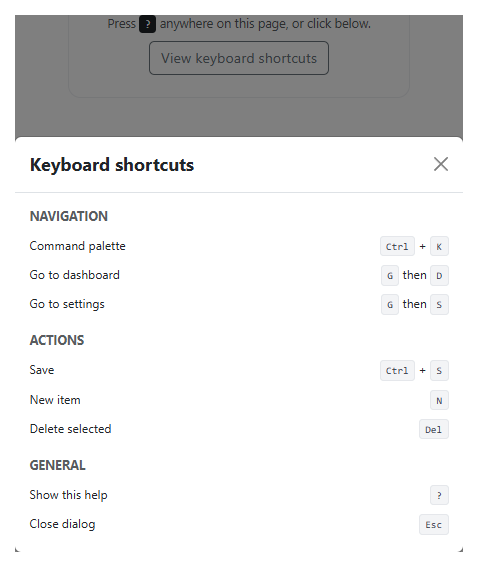
The shortcuts themselves are plain semantic markup — a heading per category and a <ul> of <kbd>-tagged key combinations — so nothing about actually displaying them needs JavaScript at all; Bootstrap's own modal handles the open/close mechanics via data-bs-toggle="modal" on the visible button.
The one piece of real logic is isTypingContext(), and it exists to fix the most common bug in a global "?"-opens-help shortcut: without it, a user typing a literal question mark into a search box, a comment field, or any text input would unexpectedly pop the help modal open mid-sentence. The check covers INPUT, TEXTAREA, and isContentEditable (for rich-text editors that aren't a native form field at all) — the same three targets any global single-key shortcut needs to exclude before it's safe to attach to document rather than to one specific element.
Build with AI
Build, Understand, Optimize, and Extend It With AI
Hand this snippet to an AI coding assistant like Claude and ask it to generate the shortcut list dynamically from a single shortcuts-definition array/object that also registers each shortcut's real keydown handler, so the documented list and the actual behavior can never fall out of sync.
Prompt to recreate it
Copy this into your AI assistant of choice to build the effect from scratch, or as a jumping-off point for your own variant:
Build a Bootstrap 5.3 keyboard shortcut help modal, using the real Bootstrap CDN framework (bootstrap.min.css and bootstrap.bundle.min.js), not custom CSS made to resemble it.

Requirements:
- A Bootstrap modal listing keyboard shortcuts grouped under at least 3 category headings, each shortcut shown as a label plus one or more <kbd> elements for its keys.
- A visible button that opens the modal via Bootstrap's own data-bs-toggle="modal" attribute.
- A global document-level keydown listener that also opens the modal when the "?" key is pressed.
- That global "?" listener must be suppressed while the currently focused element is an <input>, a <textarea>, or any element with isContentEditable true, so a user typing a literal question mark in a text field never accidentally triggers the modal.
Want to tighten it up first? Run this prompt through the AI Prompt Studio to score it across 8 quality dimensions, catch anti-patterns, and tune the wording for Claude, ChatGPT, or Gemini before you paste it in.
Source Code
<div class="container py-5 d-flex justify-content-center">
  <div class="card bskeys-card">
    <div class="card-body p-4 text-center">
      <p class="small text-muted mb-2">Press <kbd>?</kbd> anywhere on this page, or click below.</p>
      <button type="button" class="btn btn-outline-secondary" data-bs-toggle="modal" data-bs-target="#bskeysModal">
        View keyboard shortcuts
      </button>
    </div>
  </div>
</div>

<div class="modal fade" id="bskeysModal" tabindex="-1" aria-hidden="true">
  <div class="modal-dialog modal-dialog-centered">
    <div class="modal-content">
      <div class="modal-header">
        <h5 class="modal-title fw-bold">Keyboard shortcuts</h5>
        <button type="button" class="btn-close" data-bs-dismiss="modal"></button>
      </div>
      <div class="modal-body">
        <h6 class="small fw-bold text-muted text-uppercase mb-2">Navigation</h6>
        <ul class="list-unstyled bskeys-list mb-3">
          <li><span>Command palette</span><span><kbd>Ctrl</kbd> + <kbd>K</kbd></span></li>
          <li><span>Go to dashboard</span><span><kbd>G</kbd> then <kbd>D</kbd></span></li>
          <li><span>Go to settings</span><span><kbd>G</kbd> then <kbd>S</kbd></span></li>
        </ul>
        <h6 class="small fw-bold text-muted text-uppercase mb-2">Actions</h6>
        <ul class="list-unstyled bskeys-list mb-3">
          <li><span>Save</span><span><kbd>Ctrl</kbd> + <kbd>S</kbd></span></li>
          <li><span>New item</span><span><kbd>N</kbd></span></li>
          <li><span>Delete selected</span><span><kbd>Del</kbd></span></li>
        </ul>
        <h6 class="small fw-bold text-muted text-uppercase mb-2">General</h6>
        <ul class="list-unstyled bskeys-list mb-0">
          <li><span>Show this help</span><span><kbd>?</kbd></span></li>
          <li><span>Close dialog</span><span><kbd>Esc</kbd></span></li>
        </ul>
      </div>
    </div>
  </div>
</div>
.bskeys-card { width: 380px; max-width: 100%; border: 1px solid #eceef1; border-radius: 14px; }
.bskeys-list li { display: flex; justify-content: space-between; align-items: center; padding: 6px 0; font-size: 13.5px; }
.bskeys-list kbd { background: #f3f4f6; color: #374151; border: 1px solid #e5e7eb; box-shadow: none; font-size: 11.5px; }const modalEl = document.getElementById('bskeysModal');
const modal = new bootstrap.Modal(modalEl);
// Ignore "?" while the user is typing inside a real input elsewhere on the
// page — a global shortcut that fires while someone is composing text in a
// field is the single most common way this pattern annoys people.
function isTypingContext(target) {
const tag = target.tagName;
return tag === 'INPUT' || tag === 'TEXTAREA' || target.isContentEditable;
}
document.addEventListener('keydown', e => {
if (e.key === '?' && !isTypingContext(e.target)) {
e.preventDefault();
modal.show();
}
});Step by step
How to Use
- 1Load the snippetA button reading "View keyboard shortcuts" is visible, and pressing "?" works immediately.
- 2Press the "?" key on your keyboardThe shortcuts modal opens instantly, grouped into Navigation, Actions, and General.
- 3Close it and click a text field first (if this were a real page)Pressing "?" while focused in a text input is ignored, since a real question mark should be typeable there.
- 4Press Escape, or click outside the modalIt closes using Bootstrap's own built-in dismiss behavior.
Real-world uses
Common Use Cases
Got questions?
Frequently Asked Questions
Both are valid choices — a bare "?" is the de facto convention on many sites (GitHub, Slack, Linear among them) specifically because it's a single, easy keystroke, but that convenience only works safely if it's suppressed while the user is typing a literal question mark somewhere.
Yes — target.isContentEditable is checked in addition to the INPUT and TEXTAREA tag names, since a contenteditable div is a real place a user can type but isn't a native form element.
Yes. Attach the keydown listener in a mount lifecycle hook (useEffect, onMounted, ngOnInit) with cleanup on unmount, and open the modal through the framework's own modal/dialog state or a ref to Bootstrap's Modal instance.
Since the list here is plain markup, the most maintainable approach is generating it from the same shortcut-definition data structure that actually registers each shortcut's handler, so the two can never drift apart.