


Learn Coding Visually
Learn to code with interactive, live-preview playgrounds — HTML, CSS, JavaScript, React & more.
 HTML Playground42 lessons · Click-based · Live preview
 CSS PlaygroundLearn CSS with a live editor
 JavaScript Playground60 lessons · DOM · Async · Canvas
 React PlaygroundLearn React with a live code editor
 GSAP PlaygroundLearn GSAP animation interactively
 SVG Playground44 lessons · shapes · paths · animation
 SCSS Playground45 lessons · Sass modules · tokens
 Tailwind PlaygroundLearn Tailwind CSS with a live editor
 Bootstrap 5 Playground50 lessons · live preview
Bootstrap Command Palette — Free HTML CSS JS Snippet
Bootstrap Command Palette · Navigation · Plain HTML, CSS & JS · Live preview
What's included
Features
About this UI Snippet
Bootstrap Command Palette — HTML, CSS & JavaScript
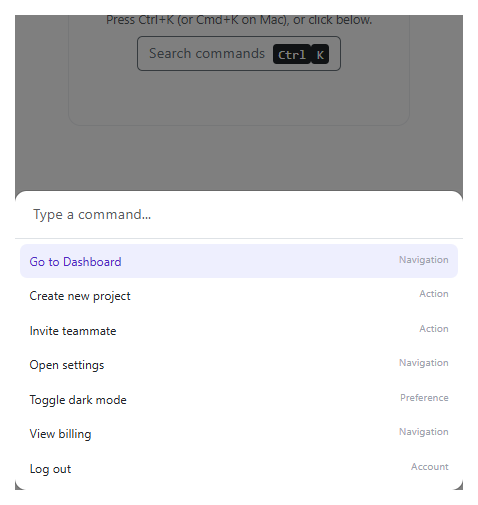
Filtering and keyboard navigation share one activeIndex and one visible array, both recomputed together inside render() — every keystroke re-filters COMMANDS into visible, then clamps activeIndex with Math.min(activeIndex, visible.length - 1) so a highlighted row can never point past the end of a list that just got shorter mid-search. Skipping that clamp is the single most common bug in a homemade command palette: filter down to two results while the fourth item was highlighted, and the highlight silently vanishes or throws trying to read an item that no longer exists.
The palette opens through two different triggers — clicking the button, or a global keydown listener checking (e.ctrlKey || e.metaKey) && e.key === 'k' — and both funnel through the same open() function, which resets the query and activeIndex before showing the modal, so a stale search from a previous session never lingers into the next one. Bootstrap's own shown.bs.modal event is what focuses the input, deliberately after the modal's own opening transition completes rather than immediately on open, since focusing an element still mid-transition can be unreliable across browsers.
Build with AI
Build, Understand, Optimize, and Extend It With AI
Hand this snippet to an AI coding assistant like Claude and ask it to group commands into labeled sections (Navigation, Actions, Recent) the way many real command palettes do, or to add fuzzy matching so a query like "godb" still matches "Go to Dashboard".
Prompt to recreate it
Copy this into your AI assistant of choice to build the effect from scratch, or as a jumping-off point for your own variant:
Build a Bootstrap 5.3 command palette (Ctrl+K style), using the real Bootstrap CDN framework (bootstrap.min.css and bootstrap.bundle.min.js), not custom CSS made to resemble it.

Requirements:
- A global keydown listener that opens a real Bootstrap modal when Ctrl+K or Cmd+K is pressed, in addition to a visible trigger button.
- Inside the modal, a search input filters a list of at least 6 sample commands live on every keystroke (case-insensitive substring match on each command's label).
- Support ArrowUp/ArrowDown to move a highlighted active index through the currently filtered list, and Enter to run the highlighted command. The active index must be re-clamped after every filter so it can never point past the end of a shortened list.
- Clicking a command in the list runs it the same way pressing Enter on it would.
- Reset the query and active index every time the palette opens, and focus the input once the modal's own open transition has finished (via Bootstrap's shown.bs.modal event).
Want to tighten it up first? Run this prompt through the AI Prompt Studio to score it across 8 quality dimensions, catch anti-patterns, and tune the wording for Claude, ChatGPT, or Gemini before you paste it in.
Source Code
<div class="container py-5 d-flex justify-content-center">
<div class="card bscmd-card">
<div class="card-body p-4 text-center">
<p class="small text-muted mb-2">Press Ctrl+K (or Cmd+K on Mac), or click below.</p>
<button type="button" class="btn btn-outline-secondary" id="bscmdOpen">
Search commands <kbd class="ms-1">Ctrl</kbd><kbd>K</kbd>
</button>
<p class="small mt-3 mb-0" id="bscmdStatus"> </p>
</div>
</div>
</div>
<div class="modal fade" id="bscmdModal" tabindex="-1" aria-hidden="true">
<div class="modal-dialog modal-dialog-centered">
<div class="modal-content bscmd-modal-content">
<div class="p-2 border-bottom">
<input type="text" class="form-control border-0 bscmd-input" id="bscmdInput" placeholder="Type a command...">
</div>
<ul class="list-unstyled mb-0 bscmd-list" id="bscmdList"></ul>
</div>
</div>
</div>.bscmd-card { width: 380px; max-width: 100%; border: 1px solid #eceef1; border-radius: 14px; }
.bscmd-modal-content { border-radius: 14px; overflow: hidden; }
.bscmd-input:focus { box-shadow: none; }
.bscmd-list { max-height: 280px; overflow-y: auto; padding: 6px; }
.bscmd-item { display: flex; justify-content: space-between; padding: 9px 10px; border-radius: 8px; font-size: 13.5px; cursor: pointer; }
.bscmd-item-active { background: #eef0ff; color: #4338ca; }
.bscmd-item span.bscmd-hint { color: #9ca3af; font-size: 11.5px; }const COMMANDS = [
{ label: 'Go to Dashboard', hint: 'Navigation' },
{ label: 'Create new project', hint: 'Action' },
{ label: 'Invite teammate', hint: 'Action' },
{ label: 'Open settings', hint: 'Navigation' },
{ label: 'Toggle dark mode', hint: 'Preference' },
{ label: 'View billing', hint: 'Navigation' },
{ label: 'Log out', hint: 'Account' },
];
const openBtn = document.getElementById('bscmdOpen');
const input = document.getElementById('bscmdInput');
const list = document.getElementById('bscmdList');
const status = document.getElementById('bscmdStatus');
const modalEl = document.getElementById('bscmdModal');
const modal = new bootstrap.Modal(modalEl);
let activeIndex = 0;
let visible = COMMANDS;
function render() {
const q = input.value.trim().toLowerCase();
visible = q ? COMMANDS.filter(c => c.label.toLowerCase().includes(q)) : COMMANDS;
activeIndex = Math.min(activeIndex, Math.max(visible.length - 1, 0));
list.innerHTML = visible.map((c, i) =>
'<li class="bscmd-item' + (i === activeIndex ? ' bscmd-item-active' : '') + '" data-index="' + i + '">' +
'<span>' + c.label + '</span><span class="bscmd-hint">' + c.hint + '</span></li>'
).join('') || '<li class="bscmd-item text-muted">No matching commands</li>';
}
function runCommand(cmd) {
status.textContent = 'Ran: "' + cmd.label + '"';
modal.hide();
}
function open() {
input.value = '';
activeIndex = 0;
render();
modal.show();
}
openBtn.addEventListener('click', open);
document.addEventListener('keydown', e => {
if ((e.ctrlKey || e.metaKey) && e.key.toLowerCase() === 'k') {
e.preventDefault();
open();
}
});
modalEl.addEventListener('shown.bs.modal', () => input.focus());
input.addEventListener('input', render);
input.addEventListener('keydown', e => {
if (e.key === 'ArrowDown') {
e.preventDefault();
activeIndex = Math.min(activeIndex + 1, visible.length - 1);
render();
} else if (e.key === 'ArrowUp') {
e.preventDefault();
activeIndex = Math.max(activeIndex - 1, 0);
render();
} else if (e.key === 'Enter' && visible[activeIndex]) {
runCommand(visible[activeIndex]);
}
});
list.addEventListener('click', e => {
const item = e.target.closest('.bscmd-item');
if (item && visible[Number(item.dataset.index)]) runCommand(visible[Number(item.dataset.index)]);
});
render();Step by step
How to Use
- 1Press Ctrl+K (or Cmd+K on Mac)The palette opens as a real Bootstrap modal with the input already focused.
- 2Type part of a command, like "dash"The list filters live to just "Go to Dashboard".
- 3Press the down arrow a few timesThe highlighted row moves down the filtered list and never overshoots the last item.
- 4Press EnterThe highlighted command runs, the palette closes, and a status message confirms which one.
- 5Reopen and click a command directly insteadClicking any row runs it exactly the same way pressing Enter on it would.
Real-world uses
Common Use Cases
Got questions?
Frequently Asked Questions
Resetting to 0 on every keystroke would keep yanking the highlight back to the top while a user is trying to arrow down toward a specific item — clamping only intervenes when the current index has actually become invalid, preserving the user's position otherwise.
Ctrl+K is free in most browsers on most platforms (Firefox uses it for the search bar in older versions, which is the one real exception), which is why command palettes conventionally offer Cmd+K as the equivalent on Mac — e.preventDefault() stops the default browser behavior once the modal opens.
Yes. Track query and activeIndex in component state, derive the filtered visible list in the render function, and attach the global keydown listener in a mount lifecycle hook (useEffect, onMounted) with cleanup on unmount.
Replace the status message inside runCommand() with a real router push, a function call, or a dispatched action — everything else (filtering, keyboard nav, modal lifecycle) is unrelated to what a command actually does when it runs.