


Learn Coding Visually
Learn to code with interactive, live-preview playgrounds — HTML, CSS, JavaScript, React & more.
 HTML Playground42 lessons · Click-based · Live preview
 CSS PlaygroundLearn CSS with a live editor
 JavaScript Playground60 lessons · DOM · Async · Canvas
 React PlaygroundLearn React with a live code editor
 GSAP PlaygroundLearn GSAP animation interactively
 SVG Playground44 lessons · shapes · paths · animation
 SCSS Playground45 lessons · Sass modules · tokens
 Tailwind PlaygroundLearn Tailwind CSS with a live editor
 Bootstrap 5 Playground50 lessons · live preview
Bootstrap Filter Chips — Free HTML CSS JS Snippet
Bootstrap Filter Chips · Forms · Plain HTML, CSS & JS · Live preview
What's included
Features
About this UI Snippet
Bootstrap Filter Chips — HTML, CSS & JavaScript
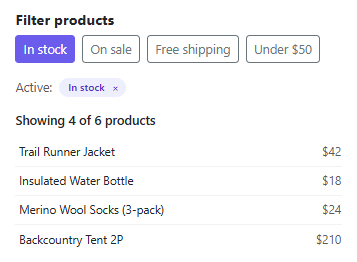
Filter chips are only trustworthy if removing one actually undoes the filter it represents, not just hides a pill. This snippet keeps that guarantee by routing every change through a single toggleFilter(key) function — clicking a filter button, clicking a chip's \u00d7, and "Clear all" all ultimately add or remove the same key from one active Set, so the toggle buttons' pressed state and the chip row are always describing identical filter state rather than two views that could drift apart.
render() recomputes the filtered product list from scratch on every change using Array.from(active).every(f => matches(p, f)) — a product only shows if it satisfies every active filter at once (a genuine AND, not an OR), which is what makes stacking "In stock" and "Under $50" together narrow the list instead of just adding more results.
Build with AI
Build, Understand, Optimize, and Extend It With AI
Hand this snippet to an AI coding assistant like Claude and ask it to persist the active filter Set to the URL query string so a filtered view is shareable via link, or to add a filter category that supports multiple selected values at once (e.g. several brands) rather than each filter being a single on/off toggle.
Prompt to recreate it
Copy this into your AI assistant of choice to build the effect from scratch, or as a jumping-off point for your own variant:
Build a Bootstrap 5.3 filter chips interface, using the real Bootstrap CDN framework (bootstrap.min.css and bootstrap.bundle.min.js), not custom CSS made to resemble it.

Requirements:
- A row of toggle buttons representing filters (e.g. "In stock", "On sale", "Under $50"), and a list of at least 6 sample items each with attributes those filters test against.
- Track active filters in a single Set. Clicking a toggle button adds or removes its key from that Set.
- Below the toggles, render a row of removable chips, one per active filter, generated directly from the same Set — clicking a chip's remove button must deactivate its corresponding toggle button too, not just remove the chip visually.
- Filter the item list using AND logic: an item only shows if it satisfies every currently active filter.
- Show a live "Showing X of Y" count, an explicit message when no items match, and a "Clear all" action that appears only once more than one filter is active.
Want to tighten it up first? Run this prompt through the AI Prompt Studio to score it across 8 quality dimensions, catch anti-patterns, and tune the wording for Claude, ChatGPT, or Gemini before you paste it in.
Source Code
<div class="container py-5 d-flex justify-content-center">
  <div class="card bschip-card">
    <div class="card-body p-3">
      <h6 class="fw-bold mb-2">Filter products</h6>

      <div class="d-flex flex-wrap gap-2 mb-3">
        <button type="button" class="btn btn-sm btn-outline-secondary bschip-toggle" data-filter="stock">In stock</button>
        <button type="button" class="btn btn-sm btn-outline-secondary bschip-toggle" data-filter="sale">On sale</button>
        <button type="button" class="btn btn-sm btn-outline-secondary bschip-toggle" data-filter="ship">Free shipping</button>
        <button type="button" class="btn btn-sm btn-outline-secondary bschip-toggle" data-filter="cheap">Under $50</button>
      </div>

      <div class="d-flex flex-wrap gap-2 mb-3 d-none" id="bschipRow">
        <span class="small text-muted align-self-center">Active:</span>
      </div>

      <p class="small fw-semibold mb-2" id="bschipCount">Showing 6 of 6 products</p>
      <ul class="list-unstyled mb-0" id="bschipList"></ul>
    </div>
  </div>
</div>
.bschip-card { width: 400px; max-width: 100%; border: 1px solid #eceef1; border-radius: 14px; }
.bschip-toggle.active { background: #6366f1; border-color: #6366f1; color: #fff; }
.bschip-pill {
display: inline-flex; align-items: center; gap: 6px;
padding: 3px 6px 3px 10px; border-radius: 20px;
background: #eef0ff; color: #4338ca; font: 600 11.5px system-ui, sans-serif;
}
.bschip-pill button { border: none; background: none; color: inherit; line-height: 1; padding: 2px; cursor: pointer; }
.bschip-item { padding: 6px 4px; font-size: 13px; border-bottom: 1px solid #f1f2f5; }
.bschip-item:last-child { border-bottom: none; }const PRODUCTS = [
{ name: 'Trail Runner Jacket', price: 42, stock: true, sale: true, ship: true },
{ name: 'Insulated Water Bottle', price: 18, stock: true, sale: false, ship: true },
{ name: 'Carbon Trekking Poles', price: 89, stock: false, sale: false, ship: false },
{ name: 'Merino Wool Socks (3-pack)', price: 24, stock: true, sale: true, ship: false },
{ name: 'Backcountry Tent 2P', price: 210, stock: true, sale: false, ship: true },
{ name: 'Compact Camp Stove', price: 45, stock: false, sale: true, ship: true },
];
const LABELS = { stock: 'In stock', sale: 'On sale', ship: 'Free shipping', cheap: 'Under $50' };
const active = new Set();
const toggles = Array.from(document.querySelectorAll('.bschip-toggle'));
const chipRow = document.getElementById('bschipRow');
const count = document.getElementById('bschipCount');
const list = document.getElementById('bschipList');
function matches(product, filter) {
if (filter === 'cheap') return product.price < 50;
return Boolean(product[filter]);
}
function render() {
const filtered = PRODUCTS.filter(p => Array.from(active).every(f => matches(p, f)));
chipRow.classList.toggle('d-none', active.size === 0);
chipRow.innerHTML = '<span class="small text-muted align-self-center">Active:</span>' +
Array.from(active).map(f =>
'<span class="bschip-pill">' + LABELS[f] + '<button type="button" data-remove="' + f + '">×</button></span>'
).join('') +
(active.size > 1 ? '<button type="button" class="btn btn-sm btn-link p-0" id="bschipClearAll">Clear all</button>' : '');
count.textContent = 'Showing ' + filtered.length + ' of ' + PRODUCTS.length + ' products';
list.innerHTML = filtered.map(p =>
'<li class="bschip-item d-flex justify-content-between"><span>' + p.name + '</span><span class="text-muted">$' + p.price + '</span></li>'
).join('') || '<li class="bschip-item text-muted">No products match these filters.</li>';
}
function toggleFilter(key) {
if (active.has(key)) active.delete(key); else active.add(key);
toggles.forEach(btn => btn.classList.toggle('active', active.has(btn.dataset.filter)));
render();
}
toggles.forEach(btn => btn.addEventListener('click', () => toggleFilter(btn.dataset.filter)));
chipRow.addEventListener('click', e => {
const removeKey = e.target.dataset.remove;
if (removeKey) { toggleFilter(removeKey); return; }
if (e.target.id === 'bschipClearAll') {
active.clear();
toggles.forEach(btn => btn.classList.remove('active'));
render();
}
});
render();Step by step
How to Use
- 1Load the snippetAll 6 products show, no filters active, no chip row visible.
- 2Click "In stock"The button highlights, a chip labeled "In stock" appears, and the list narrows to matching products.
- 3Click "Under $50" tooA second chip appears and the list narrows further — both conditions apply at once.
- 4Click the \u00d7 on either chipThat filter clears, its toggle button un-highlights, and the list updates immediately.
- 5Activate three or more filters, then click "Clear all"Every chip and toggle resets at once, back to the full product list.
Real-world uses
Common Use Cases
Got questions?
Frequently Asked Questions
AND — a product must satisfy every currently active filter to show, which is why the list gets shorter (or empty) as more filters stack, not longer.
Yes. Move the active Set into component state (a Set works fine in useState with a new Set copy on each update), and derive the chip row and filtered list directly from it on every render.
Add a new toggle button with a data-filter value, a label in LABELS, and a case in matches() describing how to test a product against it — render() and toggleFilter() need no changes.