More Layouts Snippets
Front-End Coding Playgrounds
Learn to code with interactive, live-preview playgrounds — HTML, CSS, JavaScript, React & more.
 HTML Playground42 lessons · Click-based · Live preview
 CSS PlaygroundLearn CSS with a live editor
 JavaScript Playground60 lessons · DOM · Async · Canvas
 React PlaygroundLearn React with a live code editor
 GSAP PlaygroundLearn GSAP animation interactively
 SVG Playground44 lessons · shapes · paths · animation
 SCSS Playground45 lessons · Sass modules · tokens
 Tailwind PlaygroundLearn Tailwind CSS with a live editor
 Bootstrap 5 Playground50 lessons · live preview
Image Reorder Grid — Drag-and-Drop Photo Order
Image Reorder Grid · Layouts · Plain HTML, CSS & JS · Live preview
What's included
Features
About this UI Snippet
Image Reorder Grid — Native Drag-and-Drop Reordering with a Live Cover Tile
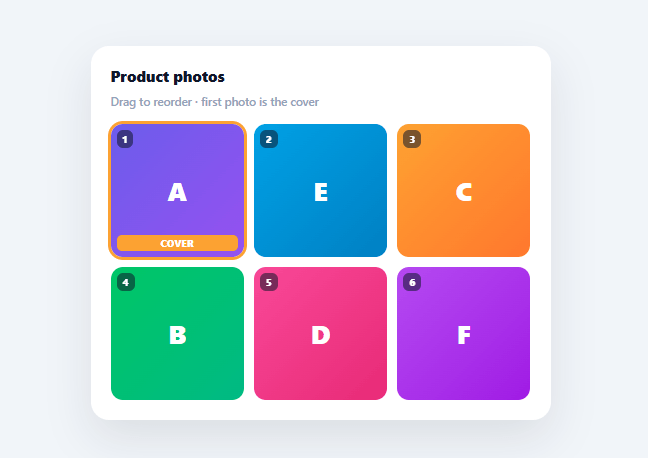
Every product, gallery, or media-management UI eventually needs the same control: a grid of images a user can physically drag into a new order, with the first slot understood as "the cover" or "the primary" image. This snippet builds that exact pattern using the browser's native HTML5 Drag and Drop API — no external sorting library — with a live-updating cover badge and order numbers.
Native drag-and-drop, not a library
Every tile is a real draggable="true" element wired to the five native drag events: dragstart (marks the dragged item and records its index), dragover (calls preventDefault(), which is required for drop to fire at all, and highlights the hovered target), dragleave (clears that highlight), and drop (performs the actual reorder). This is the same API every framework-agnostic drag library wraps under the hood — using it directly here keeps the snippet dependency-free and easy to port.
The reorder itself is two array operations
On drop, PHOTOS.splice(dragIndex, 1)[0] removes the dragged photo from its old position and returns it, and PHOTOS.splice(dropIndex, 0, moved) reinserts it at the new position — the standard "remove then insert" pattern for moving an item within an array. The whole grid then re-renders from the mutated array, so the DOM never needs to be manually shuffled; it simply reflects whatever order PHOTOS is currently in.
The cover photo is a position, not a flag
Rather than storing a separate isCover: true/false field that could drift out of sync with the actual order, "being the cover" is derived purely from array position: whichever photo is at index 0 gets the .cover class, the amber ring, and the "Cover" tag, recomputed fresh on every render. Drag any other photo into the first slot and it instantly *becomes* the cover — there's no separate "set as cover" action to remember to use.
Visual feedback during the drag
The dragged tile fades to 35% opacity and shrinks slightly via .dragging, so it's visually clear which tile is in motion without it disappearing entirely (which would make it hard to track), and the tile currently being hovered over gets an inset indigo ring via .drag-over, showing exactly where the drop will land before the user releases.
Why drag-and-drop beats numbered inputs
An older pattern for photo ordering asks users to type a position number into each thumbnail — technically equivalent, but it asks people to do arithmetic about their own intent ("this should be 3rd, so the others shift down") instead of just performing the action they're thinking of. Dragging a tile to where it visually belongs maps directly to the mental model, which is why every modern photo-managing interface has converged on it over manual position fields.
Build with AI
Build, Understand, Optimize, and Extend It With AI
Instead of tracing the drag events one by one, hand this snippet's HTML, CSS, and JS to an AI coding assistant like Claude and ask it to explain why calling preventDefault inside the dragover handler is mandatory for the drop event to ever fire, and why deriving the cover photo from array index zero rather than storing a separate isCover flag prevents the two from ever drifting out of sync. The same assistant can help optimize it — ask whether re-rendering the entire grid's innerHTML on every drop is fine for six tiles but would need a smarter diff or key-based update for a much larger photo library. It's also a good way to extend the pattern: ask it to add keyboard-based reordering for accessibility, animate tiles sliding into their new slots instead of snapping, or persist the new order to a backend automatically after each drop with an optimistic UI update. Treat the code less like a finished artifact and more like a starting point for a conversation.
Prompt to recreate it
Copy this into your AI assistant of choice to build the effect from scratch, or as a jumping-off point for your own variant:
Build a drag-and-drop reorderable image grid in plain HTML, CSS, and vanilla JavaScript using only the native HTML5 Drag and Drop API, no external sorting library.

Requirements:
- Maintain a single array of photo objects as the source of truth, and re-render the entire grid from that array on every change rather than manually moving DOM nodes.
- Every grid tile must have the draggable attribute set to true and wire up all five relevant native drag events: dragstart (record which array index is being dragged and mark that tile with a dragging visual state), dragover (call preventDefault, since this is required for the drop event to fire at all, and mark the currently hovered tile with a drag-over visual state), dragleave (clear that hover state), and drop (perform the actual reorder and re-render).
- The reorder logic on drop must remove the dragged item from its old array index and reinsert it at the dropped-on index using two array splice calls, not a full manual rebuild of the array.
- The first item in the array must always be visually treated as the cover or primary photo (a distinct border color and a text badge), computed fresh from array position on every render rather than stored as a separate flag on each photo object, so dragging any other photo into the first slot instantly makes it the new cover with no separate action required.
- Every tile must display its current 1-based position number, updating immediately after any successful reorder.
- The dragged tile must visibly fade in opacity and shrink slightly while being dragged, and the currently hovered drop target must show a distinct inset ring or border, so the user always has clear visual feedback about what is moving and where it will land.
Step by step
How to Use
- 1Paste HTML, CSS, and JSA 3×2 grid of six colored tiles renders, each numbered, with the first tile marked "Cover" with an amber ring and tag.
- 2Drag a tileClick and hold any tile, then drag it over another — the dragged tile fades and the hovered target shows an indigo ring.
- 3Drop to reorderRelease over the target tile — the array reorders, every tile renumbers, and the cover tag follows whichever photo is now first.
- 4Drag a different photo to the frontMove any tile into the first slot to make it the new cover — no separate "set as cover" control is needed.
- 5Replace the placeholder tiles with real imagesSwap each tile's gradient background and letter for an <img> tag, keeping the same drag event wiring.
- 6Persist the new orderAfter a drop, send the reordered PHOTOS array's ids (in order) to your backend so the new sequence and cover photo persist.
Real-world uses
Common Use Cases
Got questions?
Frequently Asked Questions
Replace the gradient background and letter in each tile's template string with an <img src="..."> covering the tile (object-fit: cover), keeping the same draggable="true" attribute and the badge/cover-tag overlays positioned absolutely on top of it.
After a successful drop (inside the drop handler, after PHOTOS is reordered and render() is called), send the array of photo ids in their new order to your backend, and store which id is "first" as the designated cover image.
The native HTML5 Drag and Drop API has inconsistent mobile browser support; for mobile, add touchstart/touchmove/touchend handlers that track finger position and manually reorder on a sufficient move, or use a small touch-action-aware drag library as a progressive enhancement layer over the existing desktop drag events.
Add a small "✕" button overlay on each tile that calls PHOTOS.splice(i, 1) for that tile's index and re-renders — be sure to recompute the cover automatically afterward, since it's derived from position rather than stored.
In React, keep the photos array in useState and call setPhotos with the spliced array on drop, letting React re-render the grid; in Vue, mutate a reactive array directly with the same splice logic; in Angular, use a component array field updated via the same splice calls. The native drag event wiring is identical across frameworks since it's a browser API, not a framework feature.